

👤 Who Can Delete the Account?
Only the Account Owner has permission to delete the HelloSend account.
- The Account Owner is the primary user who created or owns the account
- Admins, Users, and Custom Roles do not have access to this feature
- Even if a user has advanced permissions, account deletion remains restricted for security and data protection reasons
This ensures that critical actions like account deletion are controlled and cannot be performed accidentally by other team members.
⚠️ What Happens After Account Deletion?
Once you confirm account deletion, the following actions will take place:
Permanent Data Removal
- All conversations (SMS, WhatsApp, calls) will be permanently deleted
- Contacts, message history, notes, and activity logs will be erased
- This data cannot be recovered once deleted
Disconnection of Integrations
- All connected CRM integrations (Zoho CRM, Pipedrive, etc.) will be disconnected
- Messaging services like Twilio, WhatsApp, and other providers will be unlinked
- Any active workflows, automations, or campaigns will stop immediately
Loss of Account Access
- You and your team will no longer be able to log in to HelloSend
- All user access and permissions will be revoked instantly
Billing & Subscription Impact
- Any active subscription must be canceled before deletion
- After deletion, no further billing will occur from HelloSend
Complete System Stop
- All ongoing processes in HelloSend will be fully stopped
- Campaigns will no longer run
- Scheduled messages will not be sent
- Call routing and messaging services will be disabled
📌 Important Reminder
Account deletion is final and irreversible. Once deleted, your account and all associated data cannot be restored. Before proceeding, ensure that:
- You have exported or backed up any important data, including conversations, contacts, and reports, as this information will be permanently removed.
- All active subscriptions are canceled to avoid any pending or future billing. Deletion does not automatically cancel ongoing subscriptions.
- You no longer require access to HelloSend services, including messaging, call handling, campaigns, and CRM integrations, as all functionality will stop immediately after deletion.
- Any ongoing campaigns, automations, or scheduled messages are reviewed, as they will be stopped immediately and cannot be resumed.
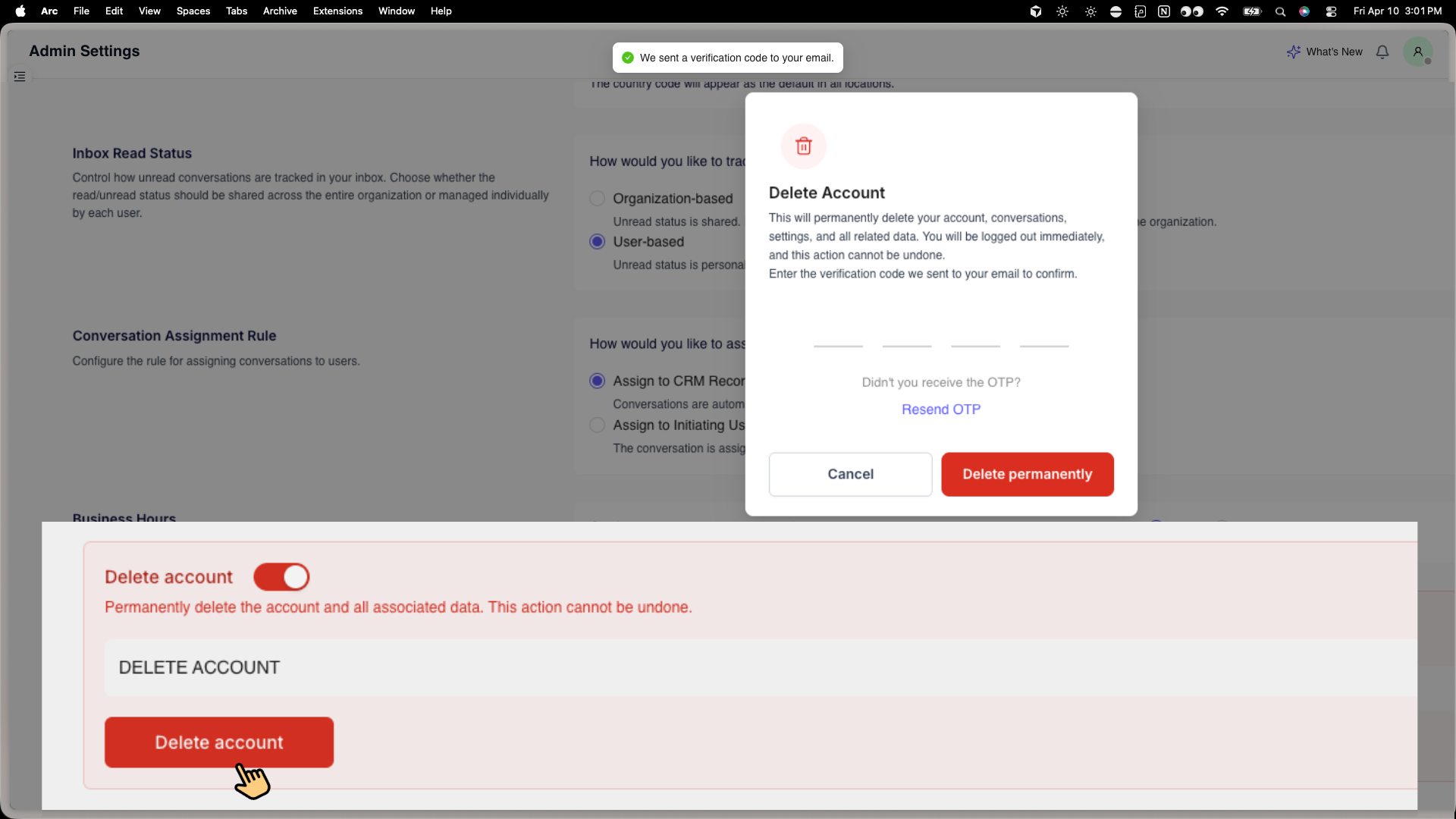
Steps to Delete Your HelloSend Account
Follow these steps to proceed with account deletion:
-
1
Log in to your HelloSend account
-
2
Go to Settings
-
3
Navigate to Admin Settings
-
4
Click on Account Deletion
-
5
Review the details and warnings carefully
-
6
Confirm the deletion to proceed
🌟 Benefits of Account Deletion
🔒 Data Privacy & Compliance
Permanently removes all your conversations, contacts, and activity data from HelloSend, ensuring your information is not stored beyond your usage. This helps businesses stay aligned with data privacy standards and internal compliance requirements.
🧹 Clean Account Management
Helps you maintain a clutter-free system by removing accounts that are no longer active. This is especially useful for teams restructuring workflows or discontinuing the use of certain tools.
💳 No Further Billing
Once your subscription is canceled and the account is deleted, no additional charges will be applied. This ensures full control over your expenses and avoids unintended billing.
⚙️ Eliminate Unused Access
Automatically disconnects all integrations such as CRM systems, messaging providers, and third-party services. It also removes user access, preventing any future login or activity within the platform.
🏁 Conclusion
Deleting your HelloSend account is a permanent action designed to give you full control over your data. Make sure all active subscriptions are canceled and that you have backed up any important information before proceeding.
If you need assistance or are unsure about any step, our support team is always here to help 👍


.webp)


.webp)
