

🔍 What is RCS Messaging Service in HelloSend?
RCS Messaging Service in HelloSend is an advanced messaging capability that allows businesses to send interactive, branded, and media-rich messages using Twilio's RCS infrastructure.
Unlike SMS, which is limited to plain text, RCS enables:
-
📸 Rich media (images, videos, GIFs)
Send visually engaging content like product images, demo videos, and promotional banners directly within messages to capture attention and improve user engagement. -
🧩 Interactive components (buttons, quick replies, CTAs)
Allow customers to take instant actions using one-tap buttons such as “Buy Now”, “Book Demo”, or quick replies—reducing effort and increasing response rates. -
🧾 Structured formats (rich cards and carousels)
Present information in a clean and organized layout using rich cards and swipeable carousels, making it easier for users to explore products or offers. -
🏷 Verified business identity (brand name, logo, verification badge)
Display your brand identity directly in messages to build trust and credibility, ensuring customers recognize your business instantly. -
📊 Real-time insights (delivery status, read receipts, engagement tracking)
Track message performance with detailed insights such as delivery status, read receipts, and user interactions to optimize campaigns and improve ROI.
This makes RCS an ideal solution for marketing campaigns, customer engagement, lead nurturing, and transactional messaging.
🌐 Why Businesses Are Moving from SMS to RCS
While SMS remains widely used, it lacks the features needed for modern communication. RCS solves these challenges by providing:
-
📈 Higher engagement rates
RCS messages include rich media, buttons, and interactive elements that capture user attention more effectively than plain text, leading to higher open rates and better engagement. -
🔒 Better trust with verified profiles
Display your business name, logo, and verification badge directly in messages, helping customers recognize your brand and increasing trust while reducing spam concerns. -
⚡ Improved conversion rates
Enable customers to take action instantly using clickable buttons and CTAs like “Buy Now”, “Book Demo”, or “View Details”, reducing friction and increasing conversions. -
📊 Enhanced analytics and tracking
Track delivery status, read receipts, and user interactions to gain deeper insights into message performance and optimize your campaigns for better ROI.
With HelloSend, businesses can take this even further by combining RCS messaging with automation, campaigns, and CRM integration to create seamless end-to-end customer journeys—from initial outreach to conversion and follow-up.
⚙️ Step-by-Step Guide to Setting Up RCS Messaging (Twilio → HelloSend)
Follow this complete process to configure RCS Messaging Service:
Access Your Twilio Account
Before setting up RCS Messaging in HelloSend, you need an active Twilio account. Twilio acts as the messaging provider that enables sending RCS, SMS, and fallback messages across carrier networks.
If you're new to Twilio:
- Create an account on Twilio and complete the onboarding process
- Verify your email and phone number to activate your account and unlock messaging capabilities
- Purchase a phone number with SMS/MMS capabilities, which will be used for fallback messaging when RCS is not supported on the recipient’s device
If you already have an account:
- Log in to Twilio Console and navigate to your dashboard
- Ensure your number supports messaging (SMS/MMS enabled), as this is required for fallback delivery and messaging service configuration
👉 This number will be used as your fallback channel. If RCS is not supported on a user’s device or network, messages will automatically be delivered via SMS to ensure reliable communication without message loss.
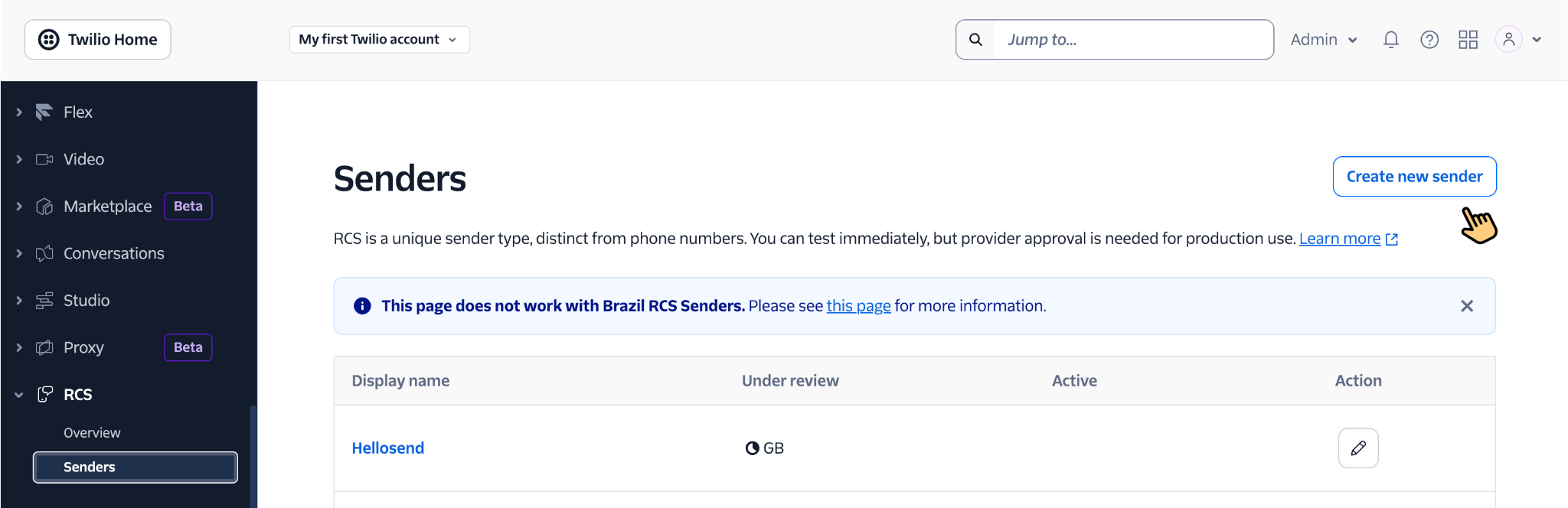
Create an RCS Sender in Twilio
To start sending RCS messages, you must first create an RCS Sender in Twilio. This represents your business identity and is required to send branded and verified RCS messages to customers.
- Navigate to RCS Messaging in Twilio Console, where you can manage RCS senders and configurations.
- Click Create RCS Sender to begin setting up your business messaging profile.
- Submit your business details such as brand name, logo, messaging use case, and business information. These details are used by carriers to verify your business and approve your sender profile.
👉 Important: The RCS Sender must go through carrier approval before you can send messages. This verification process ensures your business is legitimate and helps enable features like verified sender identity, branding, and trusted messaging delivery. Approval timelines may vary depending on the region and carrier requirements.
Create and Configure a Messaging Service in Twilio
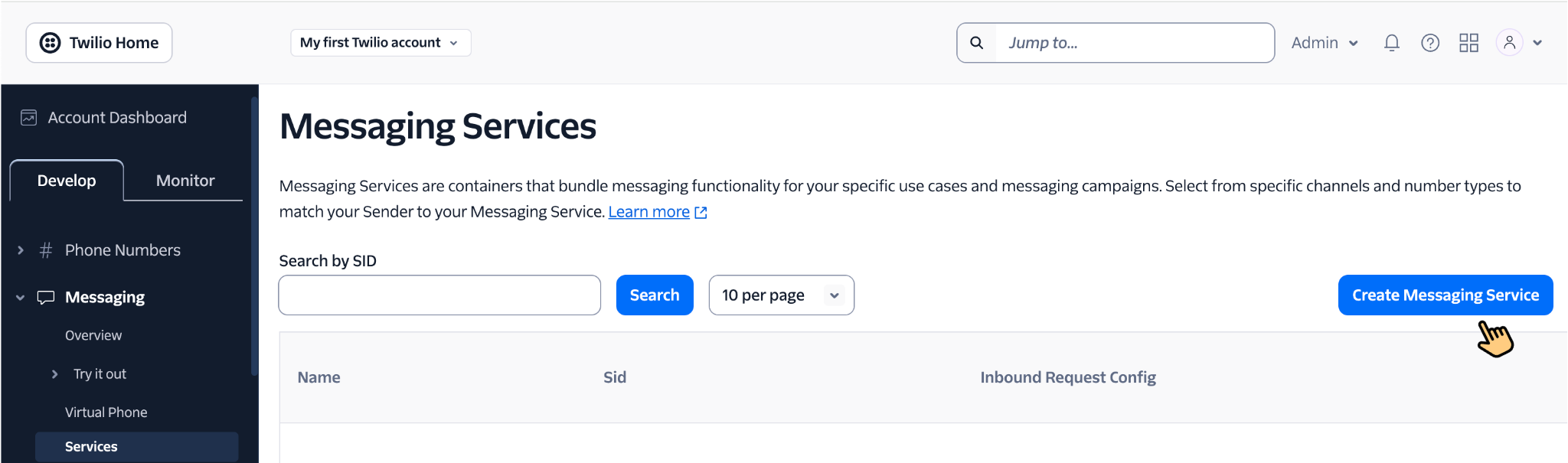
A Messaging Service in Twilio is required to manage how your RCS messages are sent. It acts as the connection layer between your approved RCS Sender and HelloSend, while also handling SMS fallback delivery when RCS is not supported on the recipient’s device or network.
Follow the steps below to create and configure your Twilio Messaging Service correctly before linking it inside HelloSend.
- Go to Messaging → Services in your Twilio Console
- Click Create Messaging Service to start a new messaging service setup
- Enter a Friendly Name to easily identify this messaging service later, such as “RCS Marketing Service” or “RCS Support Service”
- Complete the basic setup and open the newly created messaging service configuration page
- Map your approved RCS Sender to this messaging service so Twilio can use your verified business profile for outgoing RCS messages
- Add an SMS fallback number so messages can still be delivered when RCS is unavailable
- Review your messaging service settings and make sure the correct sender and fallback number are added before using it in HelloSend
- Refer to the official Twilio Messaging Services documentation for more configuration details if needed
👉 Why fallback is critical: If a user's device, carrier, or region does not support RCS, the message will automatically be delivered via SMS. This ensures maximum message reach and helps prevent communication failures.
👉 Important: After configuring the messaging service, your RCS Sender and related setup must be approved by carriers. This approval is necessary for compliance and ensures your RCS messages can be delivered across supported carrier networks.
Get Twilio API Credentials
To connect Twilio with HelloSend, you need your Twilio API credentials. These credentials act as secure identifiers that allow HelloSend to communicate with your Twilio account and send messages on your behalf.
Twilio uses two key credentials for authentication: Account SID and Auth Token. These must be entered correctly to successfully authorize the integration.
- Go to Console → Account Info in your Twilio dashboard
- Locate your API credentials and copy the following values carefully
- Account SID – Your unique Twilio account identifier used to connect services
- Auth Token – A secure key used to authenticate and authorize API requests
👉 These credentials are required to connect Twilio with HelloSend and enable messaging functionality such as RCS, SMS fallback, and campaign delivery.
👉 Security Note: Keep your Auth Token confidential and do not share it publicly. It provides access to your Twilio account and should be handled securely.
Connect Twilio to HelloSend
In this step, you will connect your Twilio account with HelloSend to enable messaging capabilities such as RCS messaging, SMS fallback, and campaign delivery. This integration allows HelloSend to securely send messages using your Twilio infrastructure. More info
Make sure you have your Account SID and Auth Token ready before proceeding.
- Open HelloSend Dashboard → Settings to access configuration options
- Navigate to Channels, where all communication providers are managed
- Select SMS/RCS → Twilio to begin integration
- Enter your Twilio credentials in the required fields
- Account SID – Used to identify your Twilio account
- Auth Token – Used to securely authenticate the connection
- Click Authorize to establish the connection between Twilio and HelloSend
👉 Once connected, HelloSend can send and receive messages via Twilio, including RCS messages, SMS fallback, and automated campaigns.
👉 Troubleshooting Tip: If authorization fails, double-check your Account SID and Auth Token, and ensure your Twilio account is active and has sufficient balance.
Configure RCS Messaging Service in HelloSend
After successfully connecting your Twilio account, the next step is to configure the RCS Messaging Service inside HelloSend. This step links your Twilio messaging setup with HelloSend, allowing you to start sending RCS messages, campaigns, and automated workflows.
By configuring the messaging service, you ensure that HelloSend uses the correct RCS sender and messaging service created in Twilio for all outgoing communications.
- Open HelloSend and navigate to Settings.
- Go to Channels in the settings menu.
- Select SMS/RCS from the available options.
- Click on Twilio to configure the settings.
- Click on the RCS / Messaging Service tab on the right side, then select Configure.
- Select RCS as the messaging channel
- Choose your RCS Messaging Service from the list (fetched from your connected Twilio account)
- Enter a Friendly Name to easily identify this service (e.g., “Marketing RCS”, “Support RCS”)
- Click Save to complete the configuration
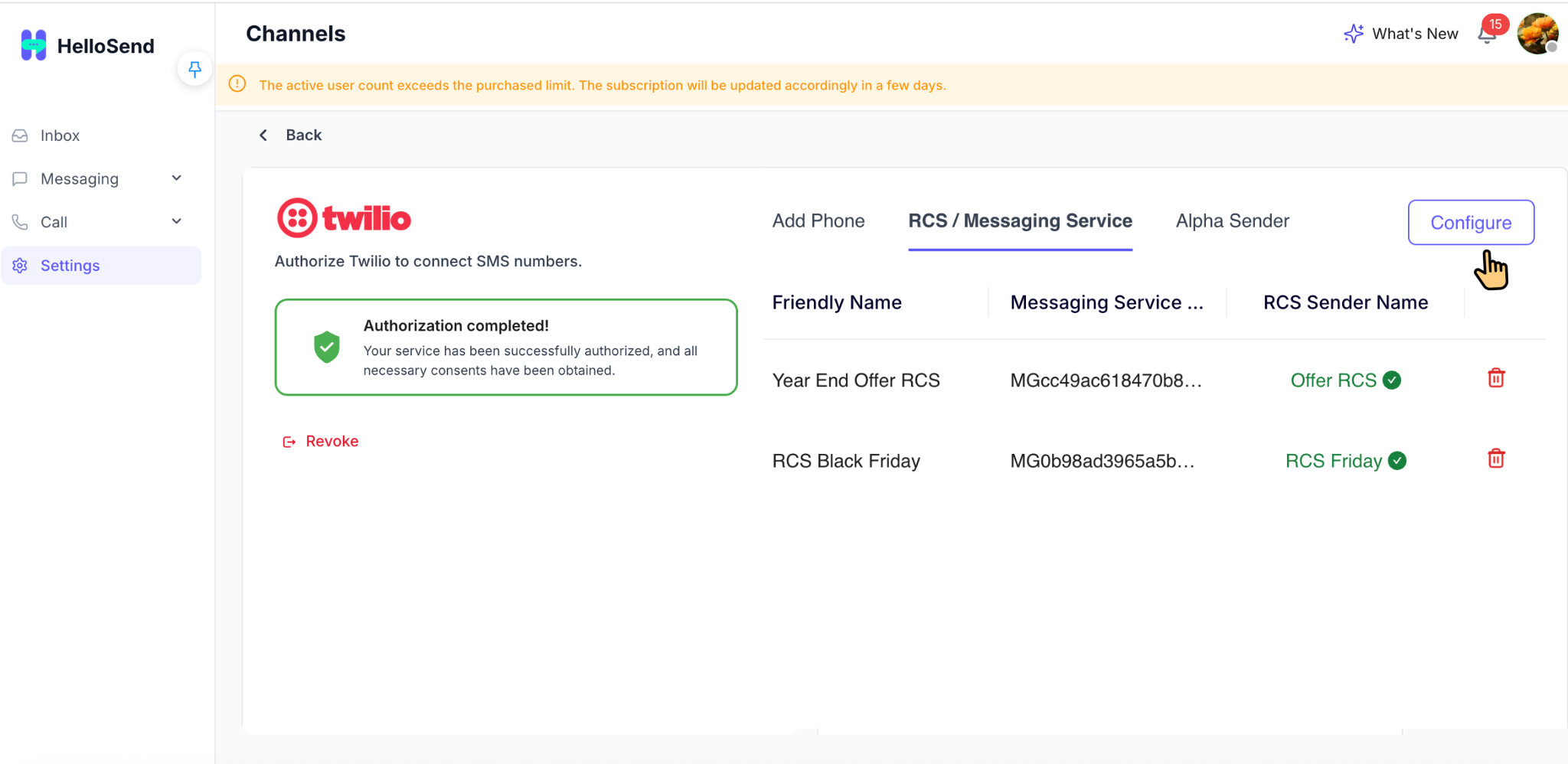
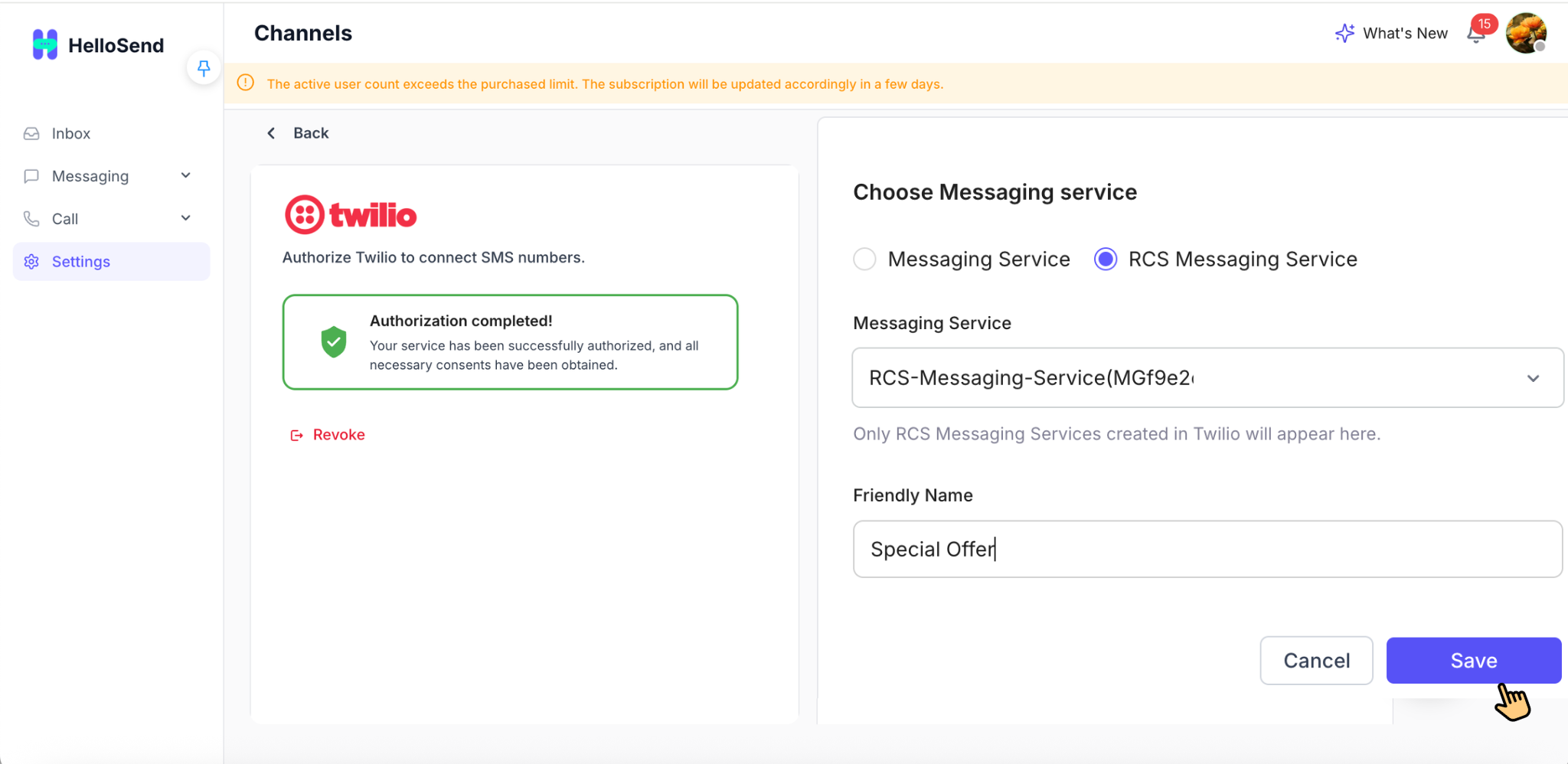
👉 The configured service will appear in your dashboard and is ready for use in campaigns, one-on-one messaging, and automation workflows.
👉 Once configured, HelloSend will automatically use this service to send RCS messages with SMS fallback, ensuring maximum delivery reach.
👉 Note: If your RCS Messaging Service is not visible, ensure that:
• Your Twilio account is properly connected
• The RCS sender is approved
• The messaging service is correctly configured in Twilio
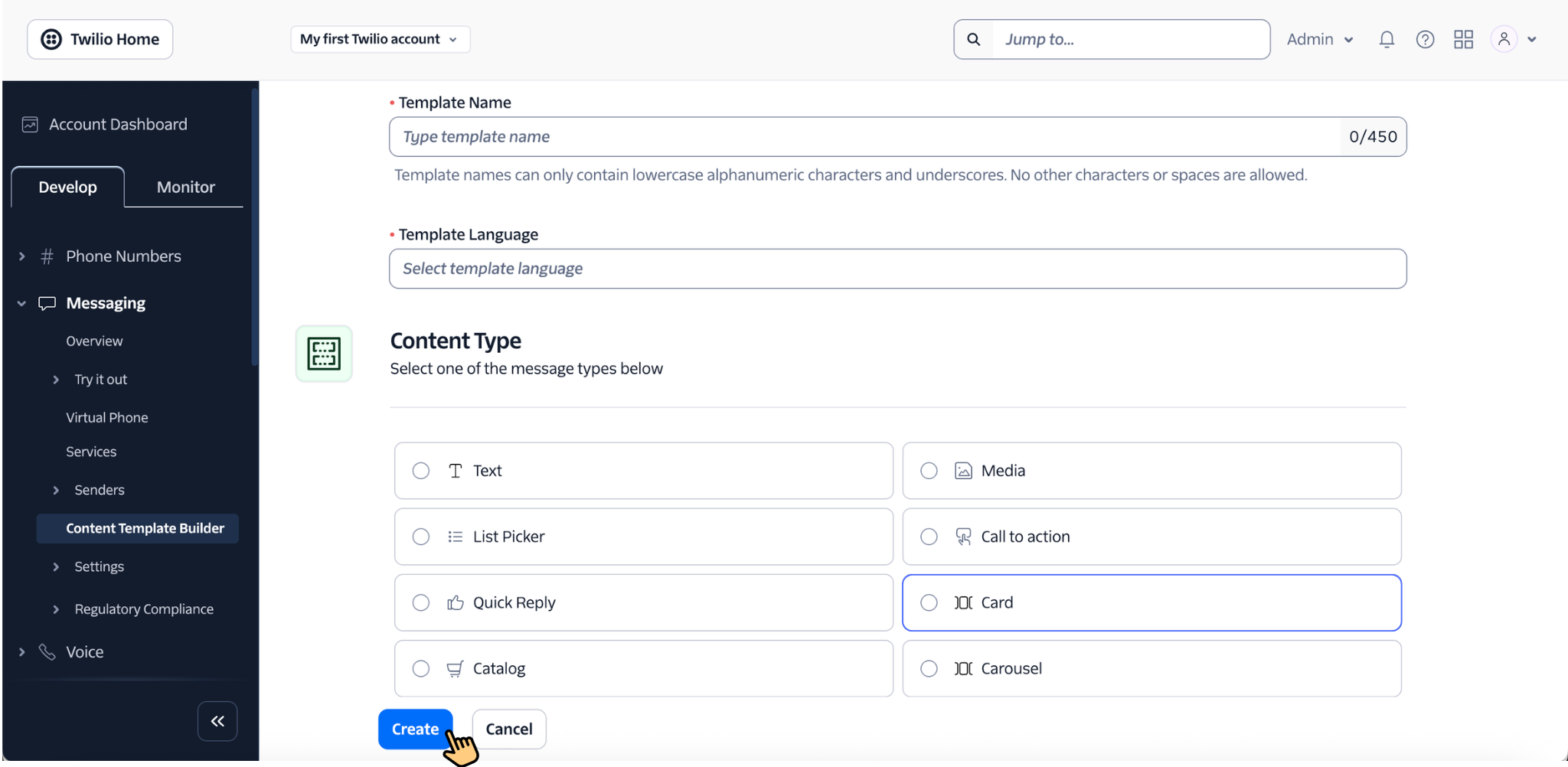
Create RCS Templates in Twilio
To send RCS messages from HelloSend, you first need to create RCS content templates in Twilio. These templates define how your message will appear to customers, including text, media, buttons, rich cards, and carousel layouts.
Twilio’s Content Template Builder allows you to create structured and reusable templates that can later be added to HelloSend for campaigns, automation workflows, and one-on-one messaging.
Follow these steps to create an RCS template in Twilio:
- Log in to your Twilio Console and open the Content Template Builder
- Click Create New Template to begin creating your RCS content
- Enter a Template Name so you can easily identify it later in Twilio and HelloSend
- Choose the content type and format you want to create for your RCS message
- Rich Cards – A single card message with media, text, and buttons. Best for promotions, featured offers, demos, and action-based communication.
- Text Templates – Structured text-based messages for alerts, reminders, confirmations, and transactional messaging.
- Add the required message content, such as title, body text, media URL, suggested replies, or call-to-action buttons depending on the selected template type
- Review the template preview to make sure the content, layout, and interactive elements appear correctly
- Save the template and submit it for approval so it can be used for live RCS messaging
👉 RCS templates allow you to send rich media, interactive buttons, branded cards, and carousel experiences, making business messaging far more engaging than traditional SMS.
👉 Templates must be approved before use. Twilio and carrier approval help ensure your content follows RCS guidelines and can be delivered properly across supported networks.
👉 Note: Only approved templates will be available for use in HelloSend. If a template is still pending or rejected, it may not appear or may fail during message delivery.
Add Templates in HelloSend
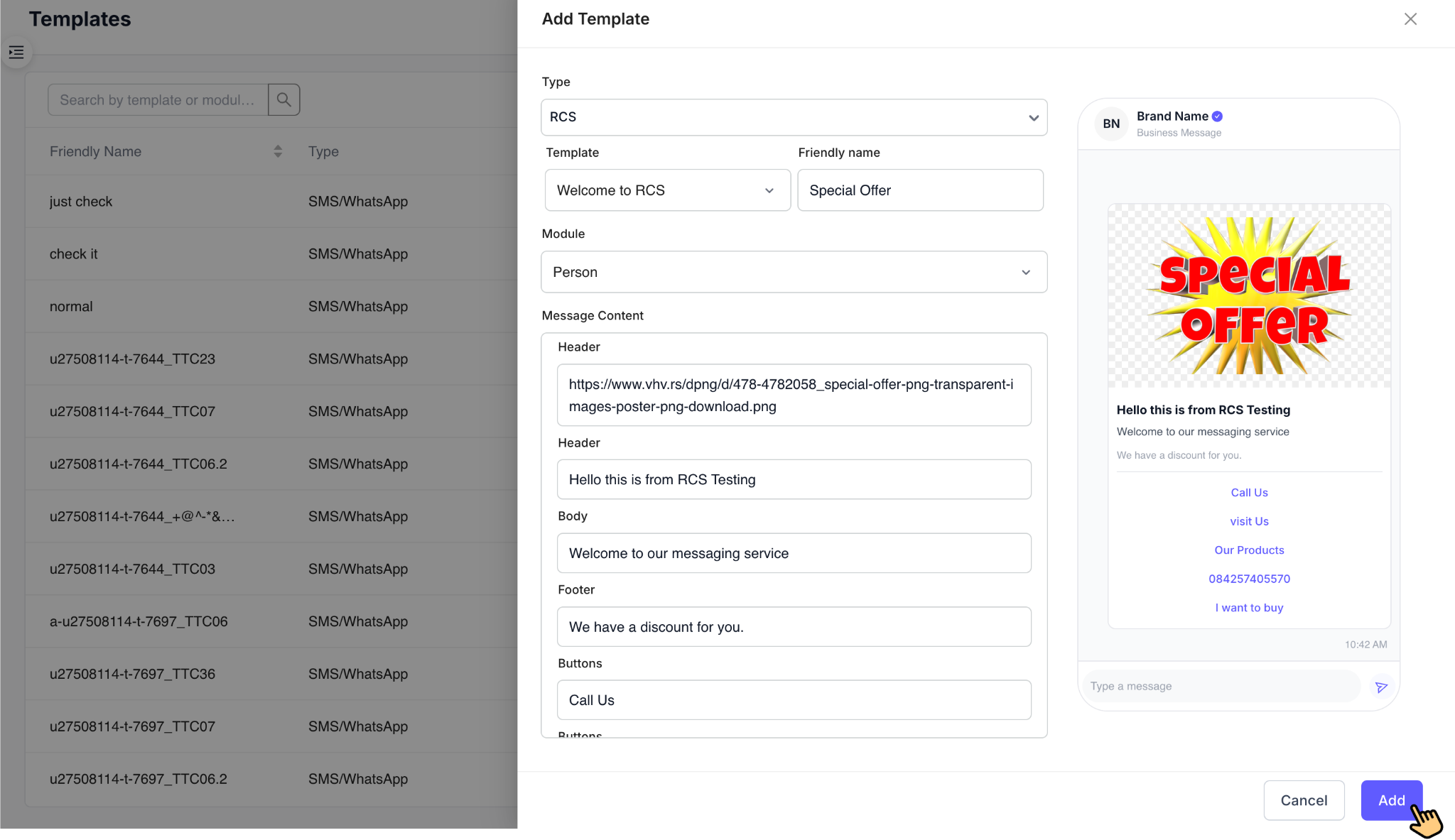
After creating and getting approval for your RCS templates in Twilio, the next step is to import and configure those templates in HelloSend. This allows you to use them seamlessly in campaigns, automation workflows, and one-on-one conversations.
HelloSend automatically fetches approved templates from your connected Twilio account, making it easy to select and manage them without manual uploads.
- Go to Settings → Templates in HelloSend
- Click Add Template to create a new template entry
- Select RCS as the messaging channel
- Choose your template from the dropdown (this list includes approved templates from Twilio)
- Enter a Friendly Name to easily identify the template (e.g., “Promo Offer”, “Welcome Message”)
- Preview the template to verify content, layout, media, and buttons before saving
- Click Add to save the template in HelloSend
👉 Templates added here are directly linked to your Twilio configuration and will be used when sending RCS messages through HelloSend.
👉 Your templates are now ready for:
- Campaigns
- Automation workflows
- One-on-one messaging
👉 Note: If your template is not visible in the dropdown, ensure it is approved in Twilio and your Twilio account is properly connected to HelloSend.
Test and Send an RCS Message
After configuring your RCS Messaging Service and adding approved templates, you can test RCS messaging directly inside HelloSend. This helps confirm that your setup is working correctly and that messages are being delivered as expected.
RCS templates can be used in Direct Messaging, Campaigns, and Automation workflows. You can also send normal text messages where supported.
Follow these steps to test an RCS message:
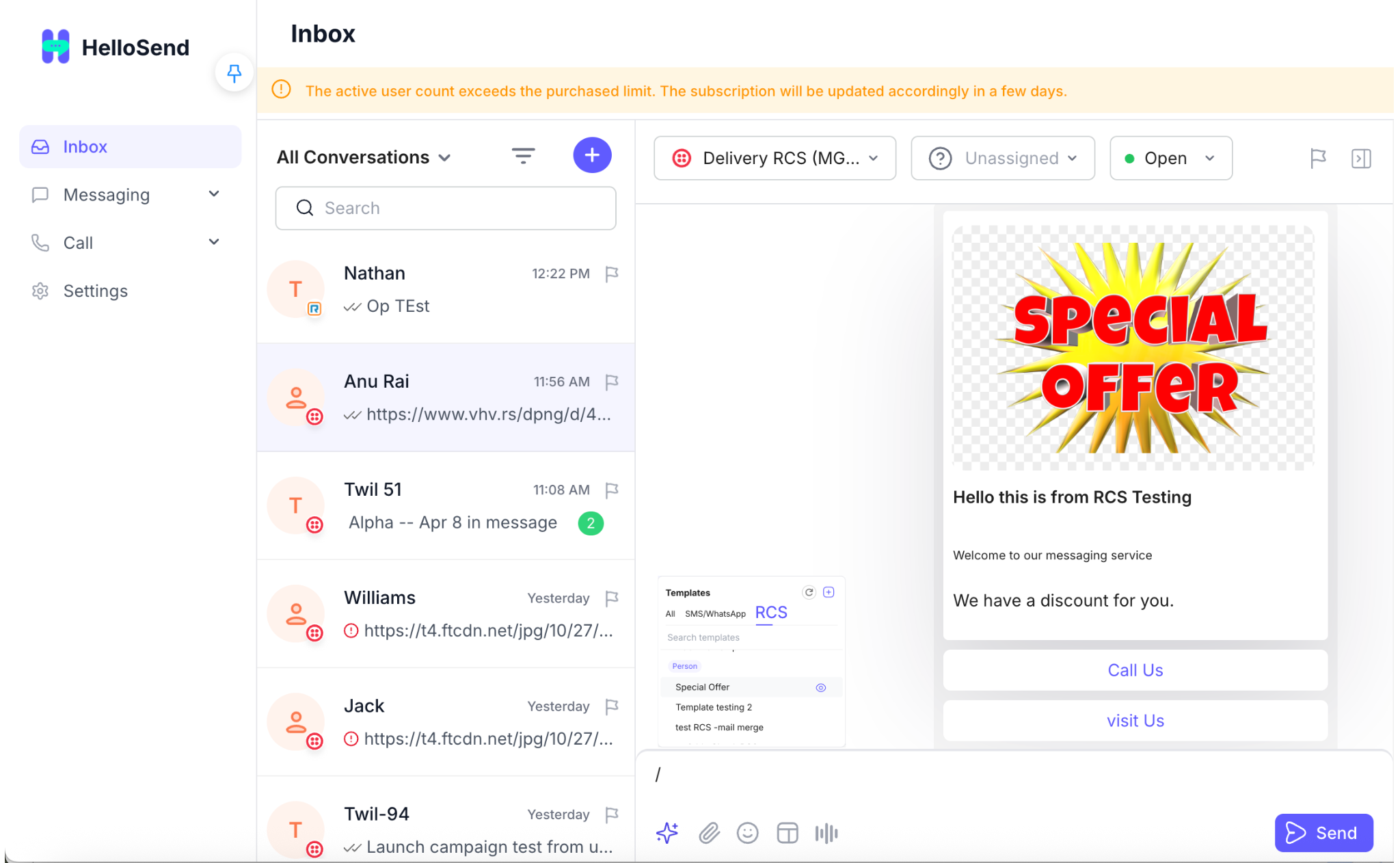
- Go to Inbox from the left sidebar
- Select an existing conversation or click + to start a new one
- Use the message box at the bottom of the conversation to start composing your message
- Type / in the message area to open the template picker
- Choose an approved RCS template from the list
- Enter or review the message content and confirm that the template details appear correctly before sending
- Click the Send button on the right to deliver the RCS message
- The message will appear immediately in the conversation timeline with a timestamp, and delivery status indicators such as ✓ Sent, ✓✓ Delivered, or error status will update automatically
- Once delivered successfully, you can verify that your RCS message is working correctly and continue using it in DM, Campaigns, and Automation
👉 RCS messages can include quick reply buttons, call-to-action options, and interactive elements that allow customers to take action instantly, such as booking, purchasing, or replying, helping improve engagement and conversion rates.
👉 In addition to RCS templates, normal text messages can also be sent depending on your configuration and fallback support.
👉 Note:
RCS messaging can be used in Direct Messaging, Campaigns, and Automation workflows.
If a message is sent to a number that does not support RCS, it will automatically be delivered as SMS using the configured fallback route.
To ensure this works, a Twilio fallback number must be added during RCS setup and also be active in HelloSend.
📌 Important Configuration Notes
-
RCS Sender approval is mandatory before sending messages.
👉 Your business profile (brand name, logo, and use case) must be verified by carriers to ensure compliance and trust. -
SMS fallback must be configured for successful delivery.
👉 Not all devices or regions support RCS, so fallback ensures messages still reach customers via SMS. -
Without fallback, messages may show as "sent" but not actually deliver.
👉 This is a common issue where delivery fails silently if RCS is unavailable and no fallback is set. -
Templates must be created and approved in Twilio before use in HelloSend.
👉 Only approved templates will appear in HelloSend and can be used for campaigns or automation. -
Carrier approval timelines may vary.
👉 Approval can take anywhere from a few hours to several days depending on region, use case, and carrier requirements. -
Twilio must be properly connected to HelloSend.
👉 Incorrect API credentials or inactive accounts can prevent messaging services and templates from loading. -
Ensure messaging service is correctly mapped.
👉 Your RCS Sender must be linked to a Messaging Service in Twilio for messages to route correctly.
🌟 Key Benefits of RCS Messaging in HelloSend
🎨 Rich & Interactive Messaging
Deliver visually engaging messages using images, videos, GIFs, carousels, and rich cards. Unlike traditional SMS, RCS allows you to create immersive experiences that capture attention and significantly improve customer engagement and interaction rates.
✅ Verified Business Identity
Display your brand name, logo, and verification badge directly in messages. This builds trust, improves brand recognition, and reduces the chances of messages being ignored or marked as spam.
⚡ Action-Driven Conversations
Enable quick reply buttons, call-to-action (CTA) options, and interactive elements that allow users to take action instantly—whether it's booking, purchasing, or responding—leading to higher conversion rates.
💬 Seamless Two-Way Communication
Move beyond one-way notifications and enable real-time, interactive conversations. Customers can respond instantly, allowing your team to engage, support, and convert leads more effectively.
📊 Advanced Insights & Analytics
Gain access to delivery reports, read receipts, and engagement tracking. These insights help you measure campaign performance, optimize messaging strategies, and improve ROI.
📱 Native User Experience
Messages are delivered directly to the user's default messaging app, eliminating the need for additional downloads. This ensures higher open rates and a seamless user experience.
👉 With HelloSend, you can combine these capabilities with automation, campaigns, and CRM integration to create powerful end-to-end customer journeys.
📈 Use Cases of RCS Messaging
RCS messaging can be applied across multiple business scenarios, helping teams improve engagement, automate workflows, and deliver better customer experiences compared to traditional SMS.
Marketing campaigns with rich visuals
Send highly engaging campaigns using images, videos, GIFs, and branded content that stand out in the inbox. RCS allows businesses to create visually appealing promotions that increase open rates, click-through rates, and conversions.
Product promotions with carousel cards
Showcase multiple products, offers, or services in a swipeable carousel format. Each card can include images, descriptions, and action buttons, allowing customers to browse and interact easily.
Appointment reminders with quick replies
Send automated reminders with one-tap quick reply options like Confirm, Reschedule, or Cancel. This reduces no-shows, improves scheduling efficiency, and enhances customer convenience.
Customer support with interactive options
Provide self-service support options using buttons like “Track Order,” “Talk to Agent,” or “View FAQs.” This reduces support workload while improving response time and customer satisfaction.
Lead qualification and engagement workflows
Automate lead qualification using interactive conversations. Ask questions, collect responses, and route high-intent leads to the right team, improving conversion and reducing manual effort.
👉 With HelloSend, these use cases can be combined with automation, CRM integration, and campaigns to build complete end-to-end customer journeys—from first interaction to conversion.
🏁 Conclusion
RCS Messaging Service in HelloSend is a powerful upgrade from traditional SMS, enabling businesses to deliver rich, interactive, and branded communication experiences directly within users' native messaging apps.
By integrating Twilio with HelloSend, businesses can seamlessly configure RCS, create interactive templates, and launch engaging campaigns—all from a single platform. With features like rich media, quick replies, verified profiles, and delivery insights, RCS empowers teams to move beyond basic messaging and build meaningful, high-converting customer interactions.
As customer expectations continue to evolve, adopting RCS ensures your communication strategy stays modern, effective, and future-ready.


.webp)


.webp)
