Business Hours in HelloSend allow you to define when your team is available to handle calls and messages. It ensures that incoming calls are routed correctly during working hours and handled efficiently outside business hours.
HelloSend provides both centralized and flexible scheduling. You can configure a default business schedule at the account level and override it within individual call flows when required.
Supported Integrations
Supported Channels
What are Business Hours in HelloSend?
Business Hours define your organization's working availability. They control how calls are routed during open and closed hours. They also help automate after-hours responses like voicemail or fallback routing.
With HelloSend, you can:
Define a centralized schedule that applies to your whole organization. This ensures all teams follow the same working hours by default. It reduces the need to configure hours separately for every call flow. This schedule can be reused across calls, automations, and routing rules.
Override the default schedule for individual call flows when needed. This allows different teams or use cases to have different working hours. For example, Sales can have different hours than Support. Each call flow can operate independently without affecting others.
Enable round-the-clock availability for specific call flows or the entire account. Calls will be handled at all times without any time restrictions. This is useful for global teams or emergency support scenarios. No "closed hours" logic will be applied when 24/7 is selected.
Set business hours based on your organization's local timezone. Ensures accurate call routing regardless of user or customer location. Prevents errors caused by time differences across regions. Each call flow or account schedule can follow the correct timezone setup.
Types of Business Hours in HelloSend
1. Admin (Account-Level) Business Hours
Admin Business Hours act as the default schedule for your organization. This schedule can be used across call flows and messaging automations.
It ensures consistency across teams and simplifies management.
2. Call Flow Business Hours
Call Flow Business Hours allow you to override the default schedule. Each call flow can have its own working hours based on use case.
This is useful when different teams operate at different times.
How to Set Up Business Hours in HelloSend
Setup Admin Business Hours
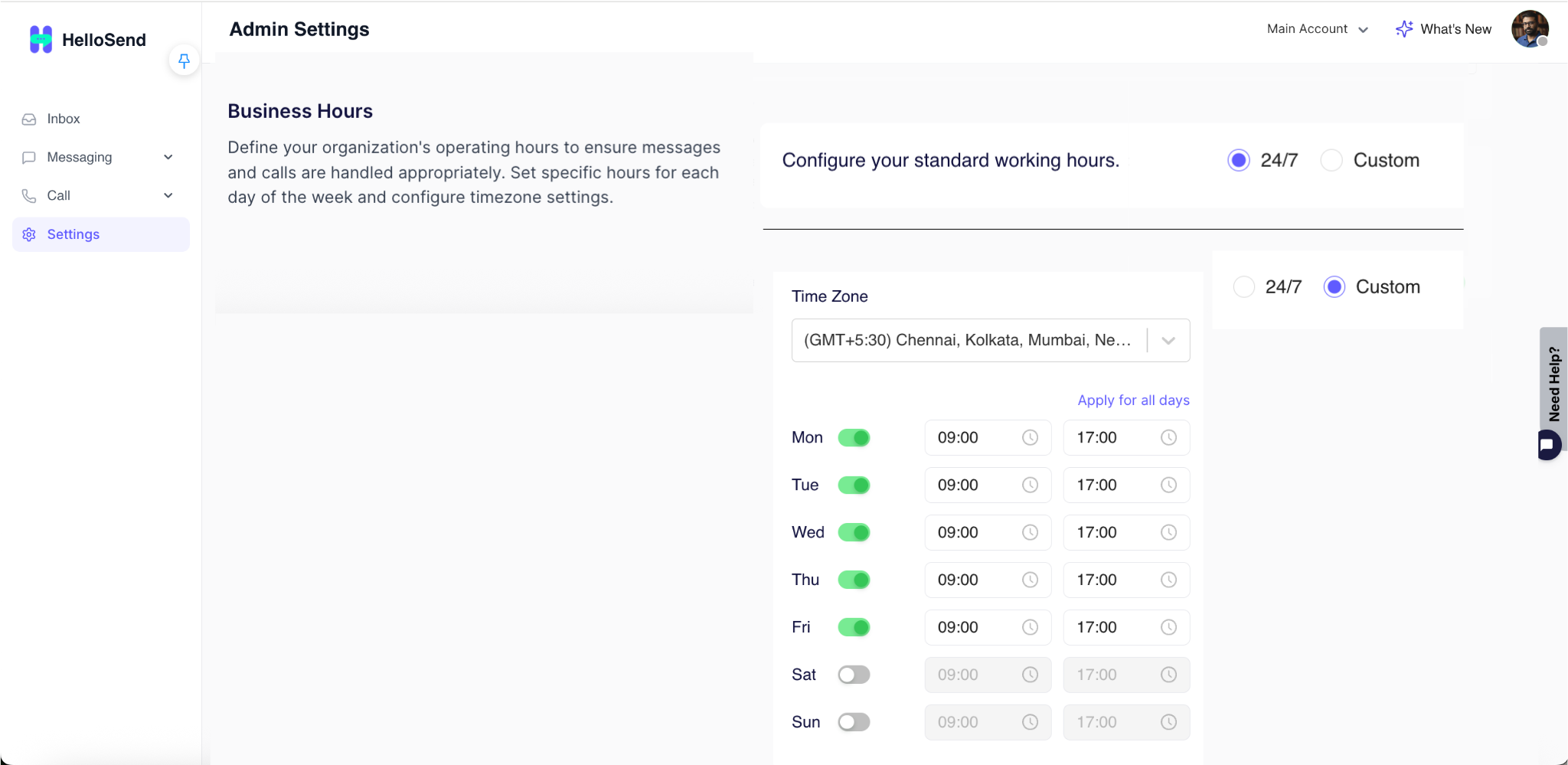
Navigate to: Settings → Admin Settings → Business Hours
Choose the timezone in which your business operates. This ensures all your working hours are calculated correctly. It helps avoid confusion when your team or customers are in different regions.
Select 24/7 if your business is always available without any time limits. Select Custom Hours if you want to define specific working hours. This choice decides whether your calls follow time-based routing or not.
Define your opening and closing time for each day of the week. You can set different hours for weekdays and weekends if needed. This allows precise control over when your team is available.
Use this option to copy the same working hours across all days. This saves time when your schedule is the same every day. You can still edit individual days later if required.
Click save to apply your business hours settings. Your schedule will now be used across calls and automations. Make sure to review your settings before saving to avoid errors.
Setup Call Flow Business Hours
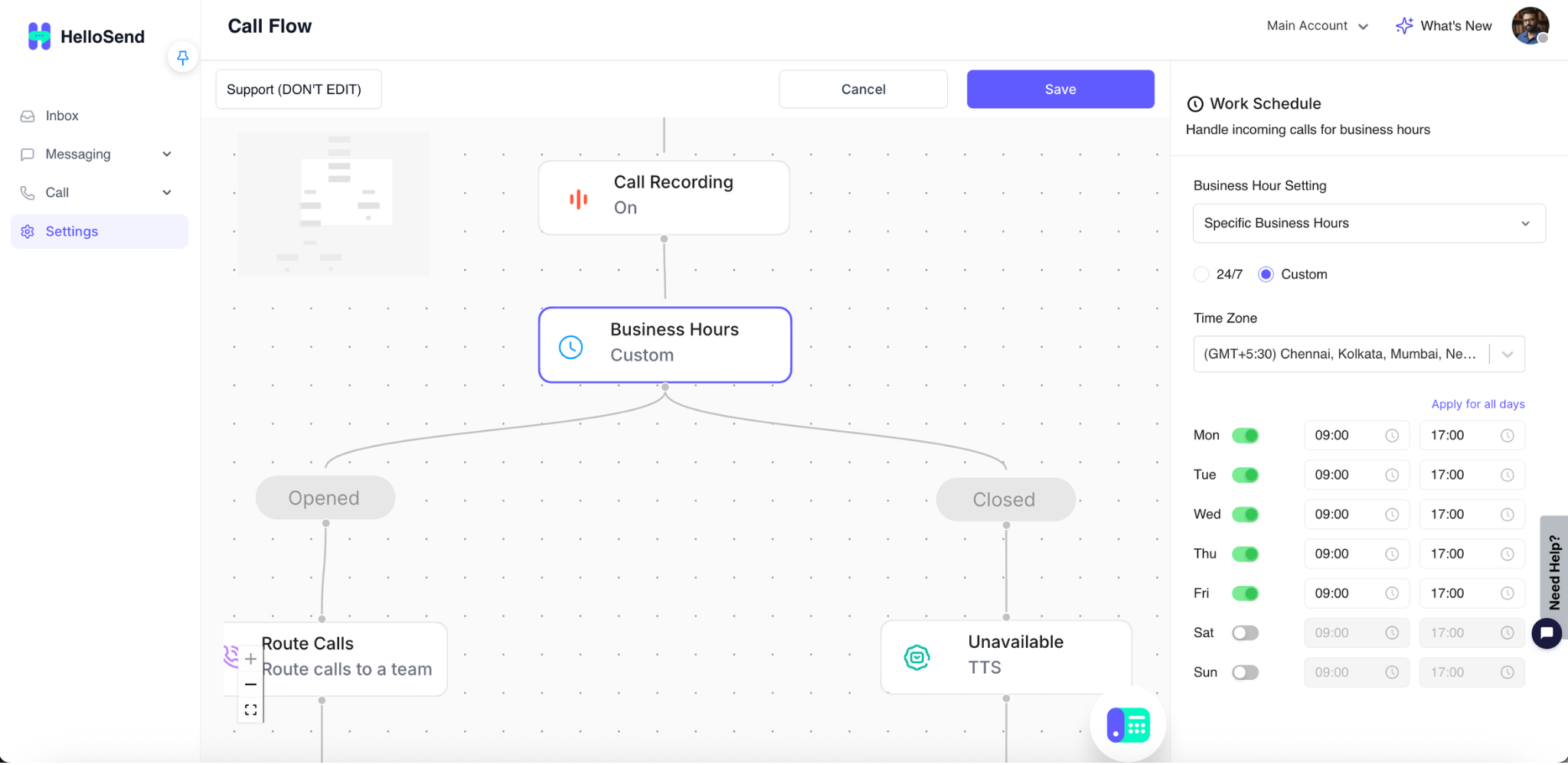
Navigate to: Settings → Channels → Call → Call Flow → Edit → Business Hours
Navigate to your call flow and click Edit to open the builder. This is where you design how incoming calls are routed. You can manage routing, actions, and business hours from this screen.
Click on the Business Hours block in your call flow. This block controls how calls behave based on time. Once selected, its settings will appear on the right-side panel.
HelloSend Business Hours (default schedule)
Uses the centralized business hours set in Admin Settings. Ensures consistency across all call flows using the same schedule.
Call Specific Business Hours (custom schedule)
Allows you to define a unique schedule for this call flow. You can set timezone and working hours specific to this flow. This does not affect other call flows or account settings.
24/7 availability
Enables the call flow to run without any time restrictions. Calls will always follow the same routing, regardless of time.
Click Save to apply your changes. Your selected business hours will now control how calls are handled. Make sure the correct option is selected before saving.
Key Features of HelloSend Business Hours
Centralized account-level scheduling
Set a single business hours schedule for your entire organization. This ensures all teams follow a consistent working time by default. It reduces manual setup and keeps configurations uniform across the account.
Call flow-level customization
Customize business hours for individual call flows when needed. Different teams or use cases can operate on different schedules. This gives flexibility without affecting the default account settings.
Timezone-based configuration
Configure business hours based on your preferred timezone. This ensures accurate call handling regardless of user or customer location. It avoids timing errors when working across multiple regions.
24/7 or custom working hours
Choose between always-available (24/7) or defined working hours. Use 24/7 for continuous support or emergencies. Use custom hours for structured business operations.
Day-wise scheduling (Mon–Sun)
Set different working hours for each day of the week. You can configure separate timings for weekdays and weekends. This allows precise control over daily availability.
Apply same schedule across all days
Quickly copy one day's schedule to all other days. This saves time when your working hours are the same every day. You can still modify individual days later if needed.
Seamless integration with call routing
Business hours directly control how calls are routed. Calls can follow different paths during open and closed hours. This ensures customers are handled correctly at all times.
Why Business Hours Matter
- Business Hours improve call handling efficiency by ensuring calls are managed only during defined working times. This reduces confusion, avoids unnecessary call transfers, and allows teams to focus on handling calls efficiently within active hours.
- They ensure customers reach the right team at the right time by routing calls based on availability and working schedules. Customers are directed without delays, minimizing wait time and improving first-call resolution.
- They reduce missed calls and improve response experience by redirecting calls outside working hours to voicemail, fallback numbers, or alternate routing paths. This ensures no customer inquiry is lost and every caller receives a proper response.
- They enable smart routing during working and non-working hours by allowing different call paths for open and closed hours. Calls go to agents during business hours and to voicemail, IVR, or alternate numbers after hours.
Conclusion
Business Hours in HelloSend give you full control over call availability and routing. You can maintain a centralized schedule while allowing flexibility at the call flow level. This ensures a smooth and professional communication experience for your customers.