🧭 How to Access Call History
- Open your HelloSend account.
- Go to Calls → Call History from the left-side navigation menu.
- The Call History page will display all call logs with complete details.
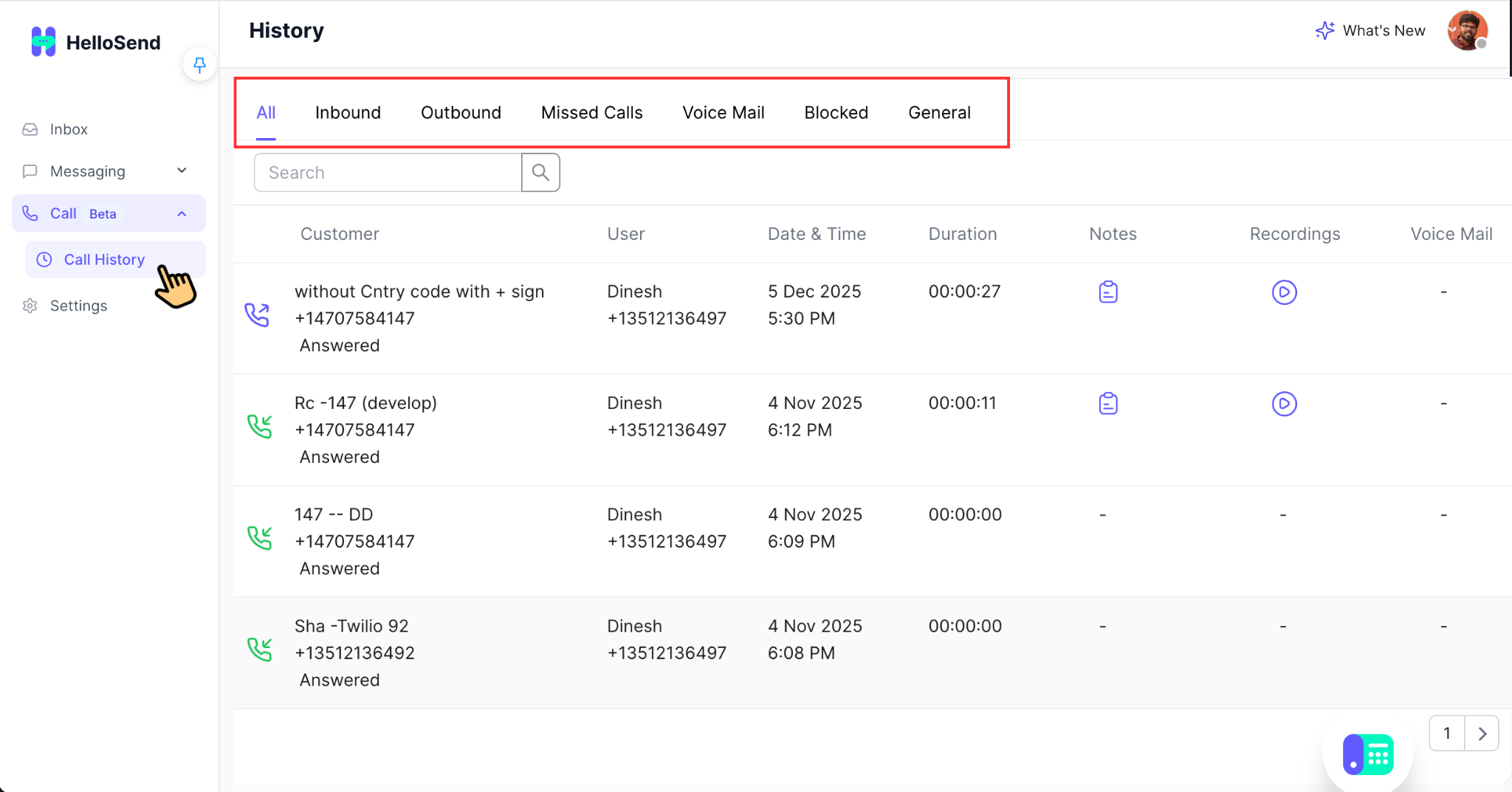
🔄 Available Call Filters / Tabs
📌 All
This tab displays every call log made or received through HelloSend. It is the most comprehensive view, useful for auditing, team management, and cross-checking activity across users. Ideal when you need a complete timeline of all calling interactions in a single place.
📥 Inbound
Shows all incoming calls received by your team. Each record includes information such as caller details, answered status, agent handling the call, and call duration. This tab is especially helpful for support teams monitoring customer enquiries and ensuring SLA compliance.
📤 Outbound
Displays all outgoing calls placed by your users. Perfect for sales teams tracking their outreach activity, follow-up sequences, and performance metrics. You can also identify calls that did not connect, went unanswered, or required further follow-up.
❌ Missed Calls
Lists all calls your team was unable to answer. These logs help prioritize callbacks and improve customer response time. Missed calls include details such as caller number, timestamp, and user availability—allowing managers to detect patterns or peak hours of missed traffic.
🎙️ Voice Mail
Shows all voicemail messages left by customers when no agent was available to respond. Each voicemail entry typically includes:
- Caller information
- Timestamp
- Playback option (if enabled)
- Associated notes
This tab ensures no customer query goes unnoticed, even after business hours.
🚫 Blocked
Displays calls automatically blocked due to:
- Spam or suspicious numbers
- Manually blocked contacts
- Heat-map or compliance rules
This helps teams filter out unwanted traffic and maintain a secure communication environment.
📄 General
Contains system-generated call logs or call activities not categorized under other tabs. This may include call routing attempts, internal transfers, test calls, or non-user events. Useful for technical review or when diagnosing call flow logic.
🌟 Benefits of Call History in HelloSend
✔ Complete visibility into all team calling activities
The Call History dashboard provides a unified list of every call made or received by your team. You can instantly see call direction (inbound/outbound), timestamps, call duration, and which user handled the interaction. This ensures managers and team leaders always have a clear overview of calling performance and communication flow.
✔ Accurate follow-up management with notes, voicemail logs, and call details
Each call entry contains detailed information — including notes recorded by the agent, voicemail attachments, caller IDs, and call status. This helps your team maintain context for every follow-up, eliminates confusion between agents, and ensures customers always receive accurate and timely responses.
✔ Enhanced quality control using call recordings for training
Supervisors can listen to call recordings directly inside HelloSend. This allows for easy monitoring, performance evaluation, and training. Real customer conversations help identify strengths, uncover improvement areas, and provide effective coaching to new or existing agents.
✔ Faster customer response through missed call tracking
Missed calls are clearly highlighted so your team can quickly return customer calls before opportunities are lost. Filtering by “Missed Calls” helps agents prioritize urgent follow-ups and maintain strong customer engagement.
✔ CRM-integrated insights for reporting and performance analysis
HelloSend automatically syncs call logs into your connected CRM. This provides valuable insights such as call volume trends, agent activity, customer engagement, and more. These analytics help your business make data-driven decisions and improve operational efficiency.
📌 Conclusion
The Call History section is an essential tool for monitoring communication performance, managing customer interactions, and improving your team's workflow. From inbound calls to detailed voicemail logs, HelloSend gives you full control and visibility over every call handled by your organization.