

Summarize this blog post with:
Quick Summary
A Zendesk WhatsApp integration connects SMS and WhatsApp messages directly to Zendesk tickets, so agents reply from the same agent workspace they already use instead of switching to a separate app. This blog covers what "unified" actually means, whether it requires any engineering brilliance, and how to evaluate an integration before you commit to one.
WhatsApp messages get opened 95 to 98 percent of the time. Email barely clears 25. That gap is why customers expect a text back now, not a ticket number three days later.
Most support teams still answer WhatsApp from someone's phone. It never touches a ticket, never gets logged, and nobody can pull it up when the same customer emails a week later asking the same question. That's the actual problem a Zendesk WhatsApp integration needs to fix.
What Problem Does a Zendesk WhatsApp Integration Actually Solve?
A Zendesk WhatsApp integration solves a specific problem: customer texts and WhatsApp chats that exist outside your ticketing system, with no SLA clock, no history, and no accountability. Support teams that answer WhatsApp from a phone or a separate business app lose the thread the moment that conversation ends.
Here's what that looks like in practice:
- An agent replies to a WhatsApp message from their personal phone, and the conversation never touches Zendesk.
- A customer texts a question, gets an answer, then emails the same question a week later because no one can find the SMS thread.
- Managers can't report on WhatsApp response times because WhatsApp isn't a tracked channel.
- Handoffs between agents lose context, since the new agent has no visibility into what was said over text.
None of this is a technology failure. It's a channel that grew faster than the systems built to track it.
What Does "Unifying" SMS and WhatsApp Into Zendesk Really Mean?
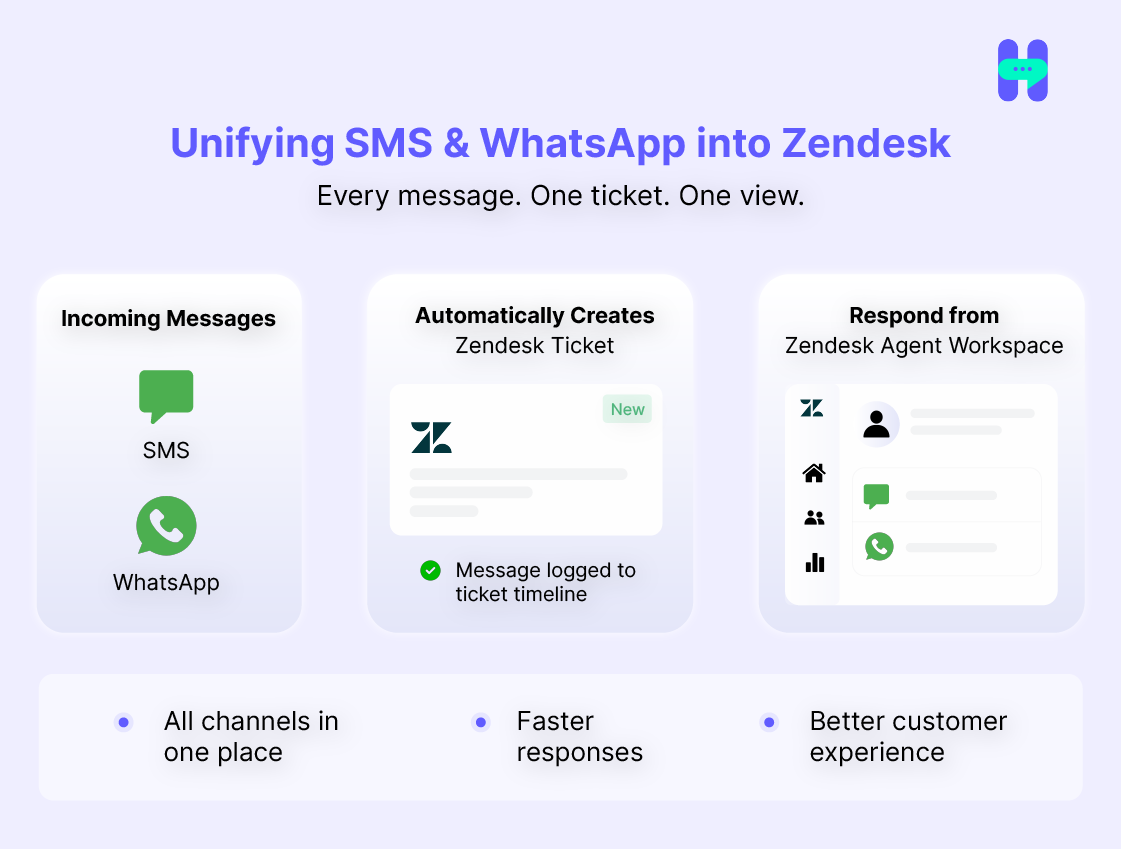
Unifying SMS and WhatsApp into Zendesk means every message becomes part of a ticket, logged automatically to that ticket's timeline, and answered from the same Agent Workspace agents already use for email and chat.
Nothing new to check. Nothing new to log into.
This is the standard you should hold any tool to before you evaluate features:
- Every inbound SMS or WhatsApp message creates or updates a ticket.
- Every reply, sent from Zendesk, gets logged back to that same ticket.
- Agents never leave Zendesk to send or receive a message.
- The conversation history stays attached to the customer record, not scattered across a phone or a separate app.
If a tool can't clear that bar, it isn't a unification. It's a second inbox with a Zendesk logo on it. For more on how Zendesk connects to systems beyond messaging, our breakdown of Zendesk CRM integrations covers the broader picture.
Does This Save Agent Time or Just Add Another System to Check?
Done right, it saves time because it removes app switching, not because it adds a feature. Every tool switch costs an agent a few seconds of context-loading. Across a full shift, that adds up to real minutes lost per ticket.
Businesses using the WhatsApp Business API for support report meaningfully faster response times and lower cost per interaction compared to phone support, since agents work replies into their existing queue instead of context-switching to a dialer.
That speed only holds if the integration is genuine:
- One reply box, not two.
- One SLA clock, tracked against the actual message, not a workaround.
- One customer record, so an agent isn't reconstructing history from memory.
- No manual copy-paste between a WhatsApp app and a Zendesk ticket.
A bolted-on tool that requires agents to check a separate tab defeats the purpose. If your team still has to open something outside Zendesk to see a WhatsApp thread, you haven't unified anything. You've added a system.
Can Your Team Handle Setup Without an Engineer?
Yes, for a purpose-built integration layer. HelloSend connects SMS and WhatsApp to Zendesk through the Zendesk Marketplace and an admin panel, not a codebase, which is what separates it from a self-built connection.
At a high level, here's what that setup involves with HelloSend:
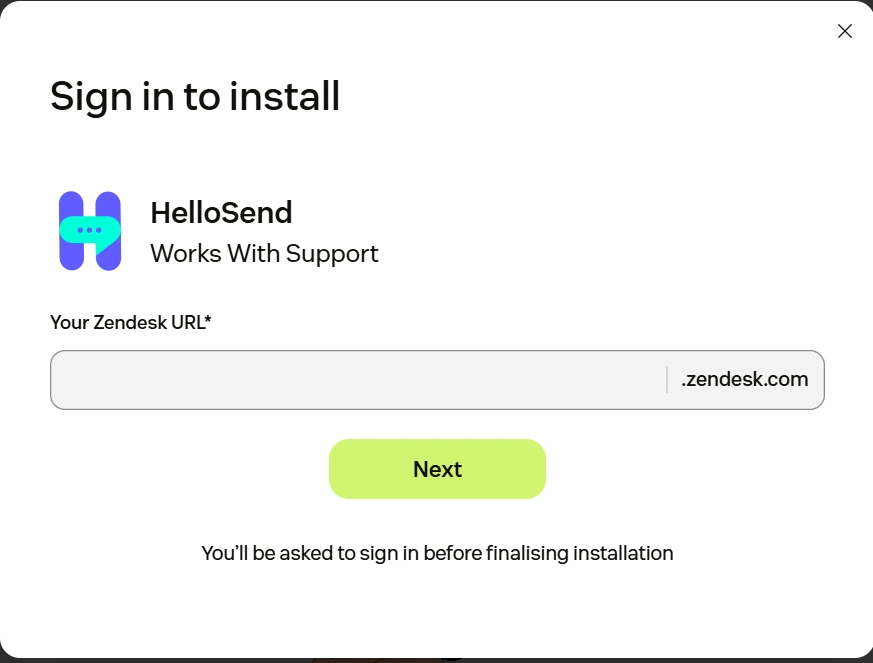
- Install the HelloSend app from the Zendesk Marketplace and add the channel app inside Zendesk's Admin Center.
- Connect your WhatsApp number through HelloSend, a QR-linked personal number for fast setup, or the WhatsApp Business API (WABA) for verified, higher-volume messaging.
- Choose your SMS channel, either your existing Twilio or RingCentral number or a number provisioned directly through HelloSend.
- Once connected, numbers activate, and messages start logging to Zendesk tickets automatically. No webhook configuration or API code required on your end.
That claim gets tested against the real alternative here, not left as an assumption. A self-built connection using the Twilio API requires your team to handle authentication, build the webhook that maps incoming messages to ticket fields, and manually configure WABA template approval.
HelloSend handles all three out of the box, and you can see the full technical walkthrough in the Zendesk SMS, WhatsApp & Voice integration setup guide.
What Should You Look For When Evaluating a Zendesk SMS/WhatsApp Integration?
Evaluate any WhatsApp for Zendesk tool against five criteria, since these are what separate a real unification from a workaround.
- Ticket-timeline logging. Every message, sent and received, should log to the ticket automatically. No manual notes, no separate export.
- WhatsApp connection type. QR-linked personal WhatsApp works for small teams testing the waters. WhatsApp Business API is what you need for verified, compliant, higher-volume messaging.
- Template and approval handling. WhatsApp requires pre-approved templates for many message types. The tool should manage that approval flow, not leave you submitting templates to Meta manually.
- Role-based access control. Support, sales, and admin users shouldn't all see every number and every conversation. Look for a shared inbox with actual permission controls, not a flat list everyone can access.
- Automation tied to ticket events. The strongest integrations trigger messages off Zendesk events, like an SLA breach or a status change, through drip campaigns or webhooks, not a separate automation tool bolted on afterward. Our Zendesk automation and webhook documentation covers how that trigger logic works in practice.
Run any tool you're considering against this list before you look at pricing. Feature comparisons mean little if the tool fails on ticket-timeline logging, since that's the entire point of unification. If your evaluation also touches outbound campaigns alongside support tickets, our SMS marketing overview covers how that side of messaging works.
Native Zendesk Texting vs. a DIY Twilio Build vs. a Dedicated Integration Layer
There are three real paths to SMS and WhatsApp inside Zendesk, and they trade off differently on engineering cost, speed to launch, and how deep the unification actually goes.
The DIY route looks free at the start and becomes a maintenance liability later. At a 10- to 100-person company, there's rarely a spare engineer to own an integration long-term, and Twilio or Zendesk API changes become your problem to fix on your own schedule. A dedicated integration layer trades a subscription cost for zero engineering overhead and a support team that's actually responsible for uptime. Our SMS marketing platform comparison looks at how these trade-offs play out across the broader tool landscape, not just Zendesk specifically.
What Mistakes Do Support Teams Make When Adding WhatsApp to Zendesk?
The most common mistake is skipping WhatsApp Business API verification and relying on a personal number indefinitely. That works for a pilot. It doesn't scale, and Meta can restrict unverified accounts from sending high volumes.
Other recurring mistakes:
1. No audit trail
Teams connect WhatsApp but don't confirm messages are actually logging to tickets and then discover the gap during a compliance review.
2. Treating it as marketing-only
WhatsApp gets set up for campaigns but never connects to the support workflow, so the unification never happens where it matters most.
3. Ignoring role-based access
Every agent can see every number and every conversation, which becomes a real problem the moment you handle sensitive customer data.
4. Underestimating the DIY engineering cost
Teams start a Twilio build assuming a weekend project, then find themselves maintaining a custom integration a year later with no one who fully owns it.
5. No pre-approved templates ready
WhatsApp rejects unapproved message formats for certain use cases, which stalls a launch that should have taken days.
Each of these is fixable before launch. None of them are fixable easily after your team has built workflows around the gap.
How Do You Know You're Ready to Move Forward?
You're ready to move from evaluation to a decision when three signals show up together: rising ticket volume across text-based channels, agents juggling more than one tool to answer a single conversation, and a compliance or reporting requirement you can't currently meet.
Watch for these specifically:
- SMS or WhatsApp volume has grown enough that "we'll track it manually" no longer works.
- Agents mention losing context on handoffs, or customers repeat themselves across channels.
- Leadership is asking for response-time reporting on channels you can't currently measure.
- You're running WhatsApp on a personal number and outgrowing what that setup can handle.
If two or more of these are true, the cost of staying unintegrated is now higher than the cost of switching. That's the point where a deeper evaluation, including pricing and a trial, makes sense. Our pricing page breaks down plans if you want to see what that next step looks like.
FAQ
1) What is Zendesk SMS and WhatsApp integration?
A Zendesk SMS and WhatsApp integration connects text and WhatsApp conversations directly to Zendesk tickets. Agents reply from the same Agent Workspace they already use for email, and every message logs automatically to the ticket history.
2) Can I integrate WhatsApp with Zendesk?
Yes. WhatsApp connects to Zendesk two ways: through Zendesk's native channel options, or through a dedicated integration like HelloSend, which connects via the Zendesk Marketplace without requiring custom code.
3) What are the benefits of integrating Zendesk with SMS and WhatsApp?
The main benefits are one ticket history per customer instead of scattered conversations, faster response times because agents stop switching apps, and accurate SLA reporting on channels that were previously untracked.
4) How does Zendesk WhatsApp integration improve customer support?
It removes app-switching. Agents reply from inside the ticket instead of a separate WhatsApp app, and managers gain visibility into response times on a channel customers expect answered within minutes.
5) Can I automate SMS and WhatsApp messages in Zendesk?
Yes. Integrations like HelloSend trigger SMS and WhatsApp messages automatically off ticket events, such as an SLA breach or status change, using drip campaigns and webhooks.

.webp)


.webp)
