

Summarize this blog post with:
An omnichannel communication platform brings channels such as SMS, WhatsApp, and voice into one workspace. The right solution connects customer conversations, integrates with your CRM, supports team collaboration, and provides clear reporting. Compare channel coverage, integration, pricing, security, and scalability before choosing a vendor.
Switching between five tabs to reply to one customer isn't omnichannel communication: it's tab fatigue.
True omnichannel messaging unifies SMS, WhatsApp, voice, and chat inside the tools your team already uses every day. It gives your reps full conversation history in one place while keeping follow-ups automated and reliable.
If you're currently evaluating tools to bring all your customer conversations under one roof, this buyer’s guide covers everything you need to know: essential capabilities, hidden integration costs, and how to choose the best platform for your tech stack.
Learn how an omnichannel customer communication strategy helps businesses connect customer interactions across channels. This guide covers what to look for, where the hidden costs sit, and how to test vendors before you commit.
Why Are Businesses Moving to an Omnichannel Communication System?
Your customers don’t care which tool your team uses. They text, they WhatsApp, they call, and they expect whoever picks up to know what happened last time.
Inside most teams, it looks like this:
- Sales follows up on WhatsApp.
- Support answers questions over SMS.
- Account managers pick up the phone.
Run those through three separate tools, and nobody holds the full picture. Connect them to one customer record, and every rep starts from the same history. For the customer side of this, read our omnichannel customer experience guide.
What Is the Difference Between Multichannel and Omnichannel Communication?
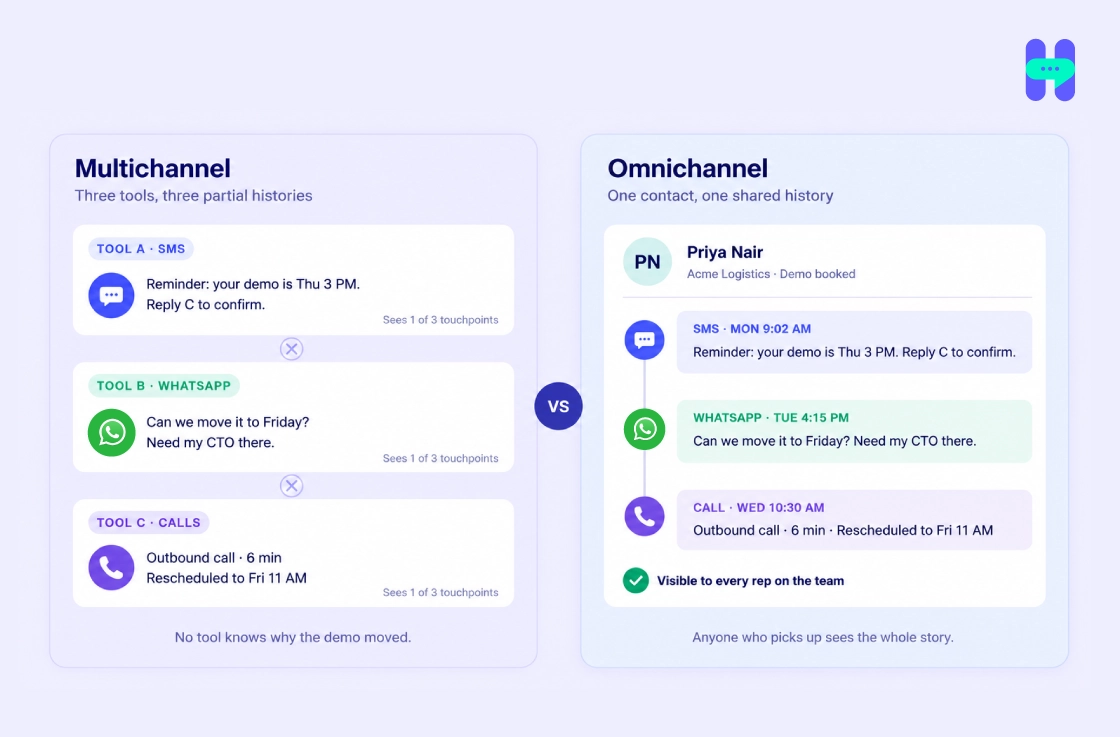
Multichannel means you’re on several channels. Omnichannel means those channels share one history.
- Multichannel: The SMS reminder sits in one tool, the WhatsApp reply in another, and the call log in a third.
- Omnichannel: All three show up in one thread, against one contact, visible to anyone on the team.
The number of channels doesn’t decide it. Shared history does.
How Do You Know You’ve Outgrown Separate Messaging Tools?
Separate tools work when two people handle every customer message. They break once the team grows. Watch for these signs:
- Reps open three apps to answer one question: did anyone reply to this person?
- Nobody knows who owns a follow-up, so two people reply or nobody does.
- Your reports live in three dashboards, each with its own idea of what a “response” is.
- You pay three vendors, manage three logins, and train every new hire on three interfaces.
If two or more of these sound familiar, it’s time to consolidate.
What Features Should an Omnichannel Messaging Platform Have?
Ignore the length of the feature list. What matters is whether the platform runs the workflows your team does every day.
- One inbox for every channel
- CRM sync that works both ways
- Automation with a human handoff
- Clear ownership of each conversation
- Reports, security, and room to grow
Does it give you one inbox for every channel?
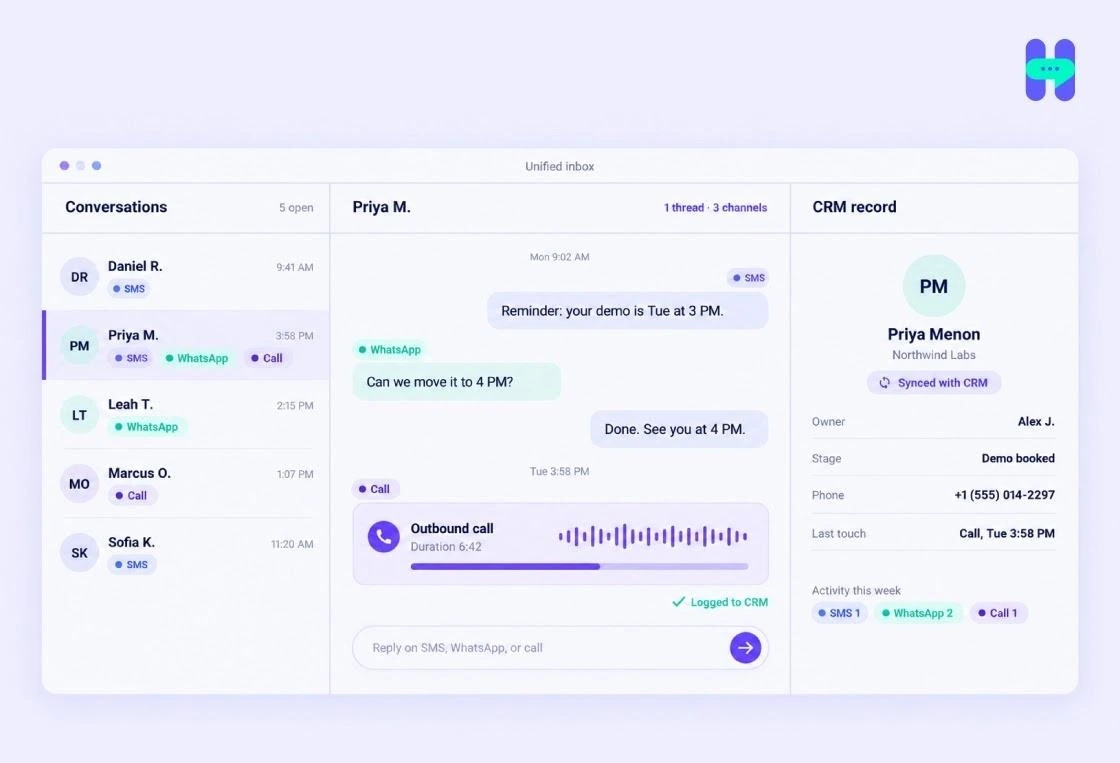
This is the core feature. If the platform can’t show SMS, WhatsApp, and calls in one thread per customer, keep looking.
- Which channels are native and which need an add-on or third-party connector?
- Does history merge per contact or stay split by channel?
- SMS: reminders, alerts, quick follow-ups.
- WhatsApp: longer conversations, rich media, approved templates.
- Voice: inbound and outbound calls logged in the same thread.
- Email and web chat: if your customers use them, confirm they sit in the same inbox.
Does it work inside your CRM?
A connector on a marketplace doesn’t prove it does what you need. Make the vendor run your workflows in your CRM, with your fields. Ask:
- Do contacts sync both ways?
- Can a rep see the full message history on the contact record?
- Are messages and calls logged as CRM activities?
- Can a deal stage change or form fill trigger a message?
- What happens with duplicate contacts, field mapping, and failed syncs?
Can it automate follow-ups?
Reminders, follow-up sequences, and routing should run without a rep pressing send. You set the trigger, the channel, and the point where a person takes over.
- Triggers from CRM events, beyond time-based schedules
- A clear handoff when a reply needs a human
- Opt-in and opt-out handling built in
Can your team share conversations without tripping over each other?
Two reps answering the same customer looks sloppy. A conversation nobody answers looks worse.
- Assign every conversation to an owner
- Leave internal notes on the thread
- Set role-based permissions
- See unassigned and unanswered threads at a glance
Can you trust the reports?
You want one set of numbers across channels, with the same definitions.
- Delivery, replies, call outcomes, and team workload
- Filters by channel, team, date, and campaign
- Exports, or a feed into the BI tool you already use
Is it secure?
Customer messages carry personal data. Treat security as part of the evaluation, not a box procurement ticks at the end.
- Encryption, two-factor or SSO login, and audit logs
- Where data is stored, how long it’s kept, and how you export or delete it
- Compliance documents in writing, with the scope spelt out
Don’t take “we’re compliant” on trust. Ask for the document.
What Hidden Costs Should You Check Before You Buy?
The starting price on the plan page isn’t your bill. Check every line below:
- Per-user fees past the included seats
- Message and call rates, plus overage charges
- Carrier fees and whether the vendor marks them up
- 10DLC registration if you text US numbers
- Phone number fees
- Paid integrations or connector add-ons
- Premium support tiers
Build a monthly estimate from your real user count and volume. Compare vendors on that number.
How Should You Compare Platforms Side by Side?
Shortlist two or three vendors and score them on the same sheet. For a wider list of tools, see our guide to the best omnichannel marketing platforms.
- Run your top three workflows in each trial, inside your CRM.
- Score each vendor on the table below.
- Price each one based on your expected users and volume.
Where Does HelloSend Fit?
HelloSend puts SMS, WhatsApp, and voice inside the CRM your team already works in. It connects with Zoho CRM, HubSpot, Pipedrive, Salesforce, Zendesk, and Microsoft Teams.
What you get
- One inbox for SMS and WhatsApp, including the WhatsApp Business API
- Unlimited inbound calls, 300 outbound calls a month, IVR, call forwarding, and transcripts
- Up to 300 CRM-triggered automations per account
- Role-based permissions and built-in opt-in and opt-out management
- AI-assisted replies
What it costs
- Standard plan: $75 a month for 3 users, or 60amonthonyearlybilling(720 a year)
- Messages: 10,000 a month shared across the team, 16,000 at 5 users, 31,000 at 10; unused credits roll over
- More users: 25peruserpastthree;1-user(45) and 2-user ($60) plans for smaller teams
- 10DLC: $100 one-time, and HelloSend handles the registration for you
- Trial: 3 days, no card, 250 messages
Choose a plan based on your expected usage rather than the starting price alone.
See HelloSend's pricing.
Conclusion: Which OmniChannel Messaging Platform Should You Choose?
Choose the platform that runs your three most common workflows inside your CRM at a monthly cost you worked out from real volume. Walk away from any vendor that won’t let you test that before you sign.
- Channels match where your customers talk to you
- CRM workflows tested in a trial, not watched in a demo
- Monthly cost estimated from real users and volume
If a vendor won’t give you a trial that lets you run those checks, treat that as your answer.
HelloSend fits teams that work in Zoho CRM, HubSpot, Pipedrive, Salesforce, Zendesk, or Microsoft Teams and talk to customers over SMS, WhatsApp, and phone.
FAQ
1. What is an omnichannel platform?
An omnichannel platform connects channels such as SMS, WhatsApp, and voice in one workspace. It helps teams manage customer interactions, access relevant conversation history, and coordinate follow-ups across supported channels.
2. What is omnichannel communication, and how is it different from multichannel?
Omnichannel communication connects every channel to one shared customer history. Multichannel means you use several channels, each in its own tool, so a conversation that moves from SMS to a call splits across systems.
3. Which omnichannel messaging platform is best for small and mid-sized businesses?
The best omnichannel messaging platform depends on your channels, team size, CRM, expected message volume, and budget. Compare integration capabilities, ease of setup, reporting, security, and total cost. HelloSend is one option to evaluate for businesses using SMS, WhatsApp, and voice.
4. What features should an omnichannel communication platform have?
An omnichannel communication platform should support your required channels, CRM integration, a unified inbox, workflow automation, team collaboration, reporting, security controls, and scalable pricing. Check that each feature supports your actual workflows rather than relying on the vendor's feature list.
5. What hidden costs should I check when buying an omnichannel messaging platform?
Check for setup fees, per-user charges, message and call rates, phone number fees, channel add-ons, integration costs, usage overages, and premium support charges. Calculate the estimated monthly cost using your expected users and communication volume, not just the advertised starting price.




.webp)
