Summarize this blog post with:
Quick Summary
Master the art of CRM WhatsApp integration with Zoho CRM. This step-by-step guide helps you set up seamless communication, enhance customer engagement, and increase sales with minimal effort.
What if you could answer customer inquiries within minutes and keep track of every interaction in one place? Zoho CRM WhatsApp integration offers just that. By connecting WhatsApp directly to your CRM, you unlock a seamless way to engage with customers and automate your communication, ensuring faster response times and better service.
Stats say that recipients read 80% of WhatsApp messages within 5 minutes. Integrating the platform with your CRM can significantly boost customer engagement and sales through CRM automation.
In this guide, we’ll show you the exact steps to integrate WhatsApp into your CRM, allowing you to boost customer engagement and increase sales with ease.
Without any further ado, let's get started!
Why Does Business Need Zoho CRM WhatsApp Integration?
Businesses need to communicate with customers quickly. Many customers currently prefer using WhatsApp to ask questions, get support, and make purchases.
Zoho CRM WhatsApp integration connects WhatsApp with your CRM, making customer communication smoother and more organized.
Below are five key reasons why your business needs this integration.
- Improve Customer Engagement
- Automate Sales Messages
- Track Leads Easily
- Keep Conversations Organized
- Increase Sales Fast

5 Reasons Names:-
- Improve Customer Engagement
- Automate Sales Messages
- Track Leads Easily
- Keep Conversations Organized
- Increase Sales Fast
Explanation:-
1) Improve Customer Engagement
Customers expect fast replies, and WhatsApp is one of the best platforms for real-time conversations. With Zoho CRM WhatsApp integration, businesses can instantly connect with customers, answer their queries, and provide better service. And you can improve customer relation very effectively.
Since WhatsApp messages have a high open rate, you can be sure that customers see your messages. This helps businesses build stronger relationships and engage customers with regular updates, offers, and personalized interactions.
2) Automate Sales Messages
Replying to every customer message manually takes a lot of time. With CRM WhatsApp integration, businesses can automate messages for different situations.
If a customer asks about product availability, an automatic response can provide details immediately. This saves time for your team and guarantees that customers receive quick and accurate responses.
3) Track Leads Easily
Sales teams often lose track of potential customers. With WhatsApp CRM integration, all customer conversations are kept in Zoho CRM.
This means you can see each customer's complete chat history, track their interest levels, and schedule follow-ups at the right time.
4) Keep Conversations Organized
Managing customer messages separately on WhatsApp can be disorganized, mainly when different team members handle the same customer. Zoho CRM WhatsApp business integration keeps all conversations organized in one place.
5) Increase Sales Fast
Speed matters when it comes to closing deals. Studies show that businesses responding to leads within five minutes are twenty-one times more likely to convert them into customers.
Zoho CRM integration with WhatsApp allows businesses to send quick responses, share product information, and schedule appointments instantly.
Best Tool: Integrate HelloSend With Your Favorite CRM
While there are several options for Zoho WhatsApp Integration, HelloSend stands out as one of the best solutions. HelloSend makes the process of connecting WhatsApp to Zoho CRM seamless, reliable, and scalable.
Here’s why HelloSend is a top choice:
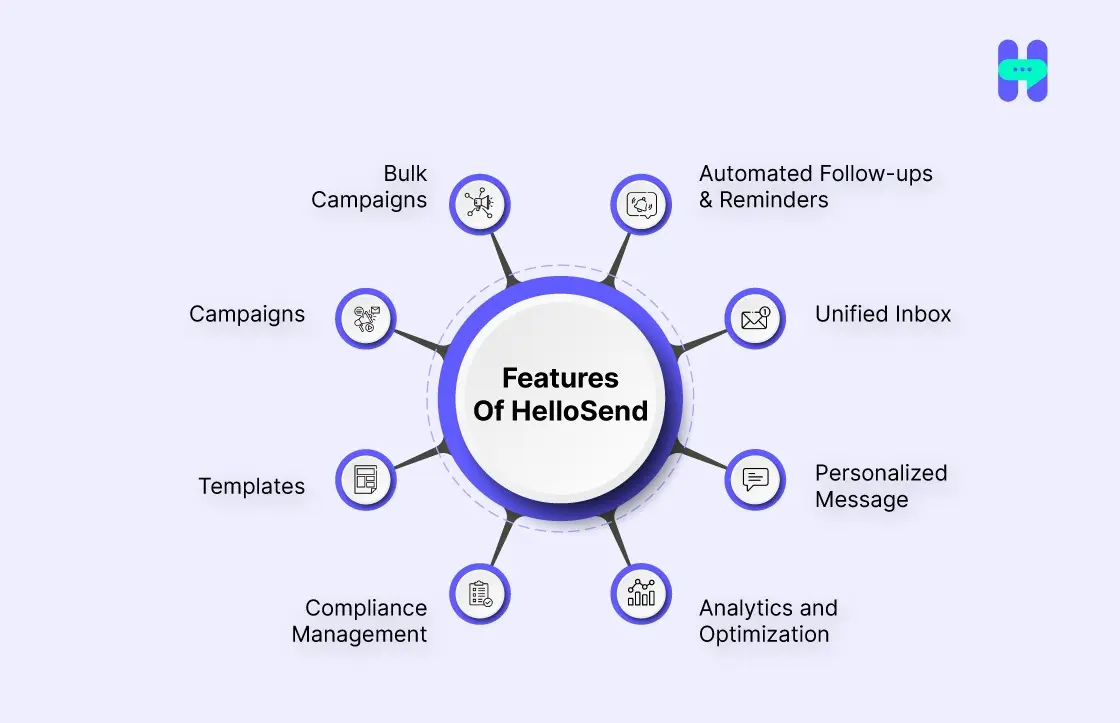
- Automated Follow-ups & Reminders: Automatically send follow-ups and reminders to leads based on Zoho CRM workflows, ensuring timely communication.
- Unified Inbox: Centralize all SMS and WhatsApp conversations in a single inbox, streamlining communication without switching between platforms.
- Personalized Messages: Automate personalized SMS and WhatsApp messages at scale, using customer details from Zoho CRM for faster conversions.
- Analytics and Optimization: Measure the effectiveness of your messaging efforts and optimize strategies for better engagement.
- Compliance Management: Stay compliant with privacy regulations, including SOC 2 Type 2, HIPAA, and TCPA, with automated opt-in/opt-out management.
- Templates: Use ready-made message templates for quick and consistent communication, saving time while maintaining professionalism.
- Campaigns: Run and manage SMS/WhatsApp marketing campaigns seamlessly, targeting your Zoho CRM contacts for higher engagement.
- Bulk Campaigns: Send bulk SMS and WhatsApp campaigns to your Zoho CRM contacts, effortlessly and efficiently reaching a large audience.

How To Integrate Zoho CRM With WhatsApp Using HelloSend?
Configure automated processes in Zoho CRM to simplify workflow tasks and improve efficiency.
To create a workflow in Zoho CRM, follow these steps:
Step 1: Create a template triggered when conditions are met.
Step 2: Configure workflow rules based on your specified conditions.
1) How To Create Templates?

1. Open Settings: Go to Settings.
2. Choose Template: Click on Template
3. Add Template: Click on Add Templates
4. Fill Message: Select the module and fill in the message.
5. Add Images: Click to add images to the template
6. Pick Images: Select images
7. Click Add: Click the Add button
2) How do you set up workflow rules in Zoho CRM?

1. Create Rule: Click the Create Rule button.
2. Select Module: Select a module, enter a rule name, and click 'Next.'
3. Choose Trigger: Choose the trigger action and click 'Next.'
4. Enter Value: Enter the value Next.
5. Select Action: In Instant Actions, select HelloSend to send an SMS.
6. Send SMS: Enter the value in the Send SMS form and click on Create Webhook URL.
7. Save Value: Enter the value Save.
8. Workflow Active: The workflow will be saved, and its status will be set to Active.
9. Update Stage: Navigate to any deal and update the stage to trigger the SMS.
10. Check Trigger: Go to the Saved Workflow Rules to check if the trigger is successful.
11. Confirm Success: Changed two deals; the trigger happened twice with success.
To understand it more deeply, check out this: Automate SMS/WhatsApp messages in Zoho CRM.
Moreover, if you want to connect your WhatsApp business account to HelloSend, click here!
Best Practices For Using WhatsApp With Zoho CRM
Integrating Zoho CRM WhatsApp integration into your business is just the first step. To make the most of it, you need to follow best practices. These strategies help companies to communicate better, stay organized, and follow WhatsApp’s rules.
Here’s how you can use WhatsApp with Zoho CRM effectively.

1) Automate Customer Messages
Manually replying to every message can take too much time, especially when dealing with hundreds of customers daily. Automating customer messages through CRM WhatsApp integration allows businesses to send quick responses without delay.
You can set up auto-replies for common inquiries like order confirmations, appointment reminders, or business hours. Also, you can try automated texting service for your business.
2) Use Quick Replies
Typing the same response over and over can slow down your team. With Zoho CRM WhatsApp business integration, you can create Quick Replies for frequently asked questions. These are saved message templates that customer service or sales teams can use with just one click.
3) Organize Contact Lists
A cluttered contact list can lead to confusion and missed opportunities. WhatsApp CRM integration allows businesses to segment contacts into different groups based on their needs and preferences.
You can categorize contacts as new leads, existing customers, or inactive users to send them the right messages.
4) Track Message History
Keeping track of customer conversations is essential for understanding their needs and ensuring smooth follow-ups.
If a customer requests an update on their order, the agent can quickly check the chat history instead of asking the same questions again. This creates a better customer experience and helps businesses provide faster support.
5) Follow WhatsApp Rules
WhatsApp has strict policies to prevent spam and maintain trust among users. Businesses using Zoho CRM WhatsApp integration must follow these rules to avoid getting blocked or restricted.
First, always get customer consent before sending messages. If a customer does not want to receive messages from your business, respect their choice. Second, avoid sending too many messages too quickly, as it can be seen as spam.
Third, official WhatsApp templates should be used for promotional or bulk messaging. Following these guidelines ensures your business maintains a good reputation and avoids any penalties from WhatsApp.
Also, check out these amazing WhatsApp Message templates to make your works more easy.
Conclusion
Zoho CRM WhatsApp integration brings many advantages to help businesses communicate better and work more efficiently. It allows teams to manage customer chats in one place, making it easier to track conversations and follow up with leads.
Integrating your business with Zoho CRM is wise if it relies on WhatsApp to talk to customers. It saves time, keeps conversations organized, and helps close sales faster.
To simplify this process, you can use HelloSend, a powerful tool that helps connect WhatsApp with Zoho CRM. Try it now!

FAQs Section
1. What is Zoho CRM WhatsApp Integration?
Zoho CRM WhatsApp Integration allows businesses to connect their Zoho CRM system with WhatsApp to send and receive messages directly from the CRM platform, streamlining communication and improving customer engagement.
2. How can Zoho CRM WhatsApp Integration improve customer communication?
By integrating WhatsApp with Zoho CRM, businesses can automate communication, track messages, personalize interactions, and ensure timely responses, providing a seamless experience for both teams and customers.
3. What are the prerequisites for setting up Zoho CRM WhatsApp Integration?
To set up the integration, you need a Zoho CRM account, a WhatsApp Business API account, and access to a third-party integration tool (such as HelloSend) for connecting the two platforms.
4. Can I automate WhatsApp messages through Zoho CRM?
Yes, Zoho CRM allows you to automate WhatsApp messages for tasks like sending notifications, reminders, and follow-ups based on triggers and customer data, improving efficiency and response time.
5. What are the benefits of integrating WhatsApp with Zoho CRM?
The integration offers benefits like streamlined communication, improved response rates, better customer tracking, and enhanced personalization, all of which contribute to a more efficient and customer-focused sales process.