

Summarize this blog post with:
Quick Summary
Black Friday and holiday campaigns work better when SMS and WhatsApp serve different roles. Use ready-to-use templates for sale announcements, discounts, abandoned carts, last-chance offers, and holiday promotions, then combine both channels to reach customers with timely, relevant messages. HelloSend helps teams personalize, reuse, and manage these templates across campaigns and automation.
Holiday shoppers see promotions everywhere during the busiest shopping weeks of the year. Email, social media, SMS, and messaging apps all compete for attention, so relying on one channel can leave gaps in your customer communication.
This blog brings together ready-to-use Black Friday SMS templates, WhatsApp templates, Cyber Monday messages, and holiday campaign templates. You’ll also see how SMS and WhatsApp can work together across the customer journey.
Black Friday SMS Templates
Black Friday messages need to get to the point. Use these templates for sale announcements, early access, reminders, abandoned carts, and last-chance offers.
Black Friday Sale Announcement SMS Template
Use this when your Black Friday sale goes live.
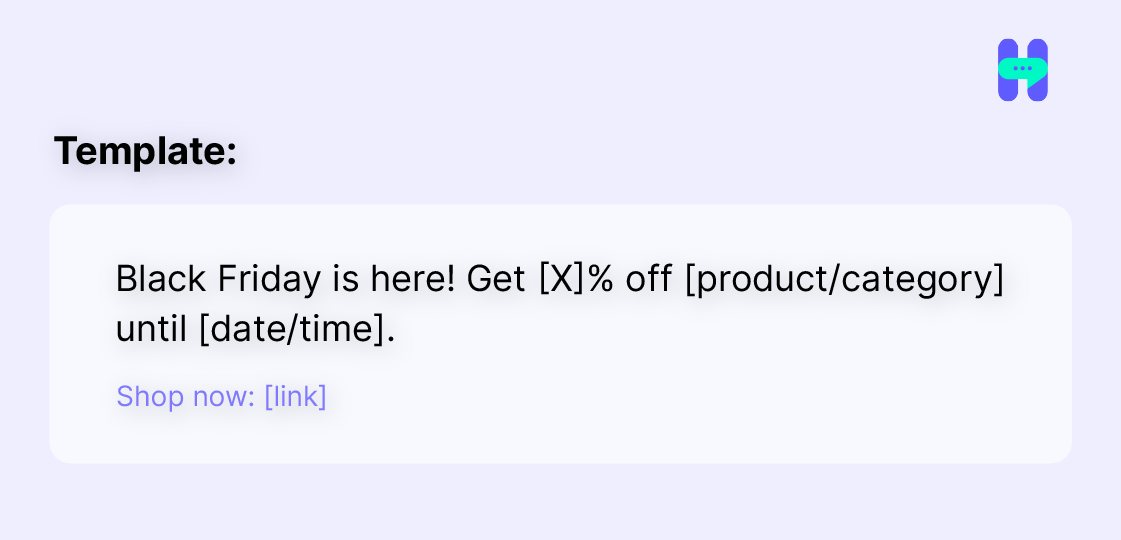
Keep the offer, deadline, and CTA clear. Customers should understand the promotion without having to read the message twice.
Black Friday Early-Access SMS Template
Give loyal or opted-in customers access before the main sale begins.
Template:
You’re getting early access to our Black Friday sale. Shop [X]% off before everyone else: [link]
Early access can also work well for VIP customers, subscribers, or existing customers.
Black Friday Discount SMS Template
Use a direct discount message when the main selling point is a specific percentage or amount.
Create urgency around an offer that expires soon.
Template:
Only [X] hours left! Get [X]% off [product/category] before this Black Friday offer ends at [time]. Shop now: [link]
Always include the actual deadline instead of using vague phrases such as “hurry.”
Black Friday VIP Customer SMS Template
Bring customers back to products they added but didn’t purchase.
Template:
Still thinking about it, {{First Name}}? Your Black Friday picks are waiting. Complete your order before the offer ends: [link]
If there is a specific discount attached to the cart, mention it.
Black Friday Back-in-Stock SMS Template
Use this when a popular product becomes available during the sale.
Template:
It’s back! [Product Name] is available again, with [X]% off for Black Friday. Get yours before it sells out: [link]
This works best when the customer has previously shown interest in the product.
Black Friday Last-Chance SMS Template
Send this near the end of the sale.
Template:
Final hours: Black Friday [X]% off ends at midnight. Don’t miss the deal: [link]
Keep last-chance messages short. The deadline should be the most noticeable part of the message.
For more ready-to-use campaign ideas, explore HelloSend’s SMS marketing templates.
Black Friday WhatsApp Templates
WhatsApp gives businesses more room to provide product details, recommendations, and direct assistance alongside the promotion.
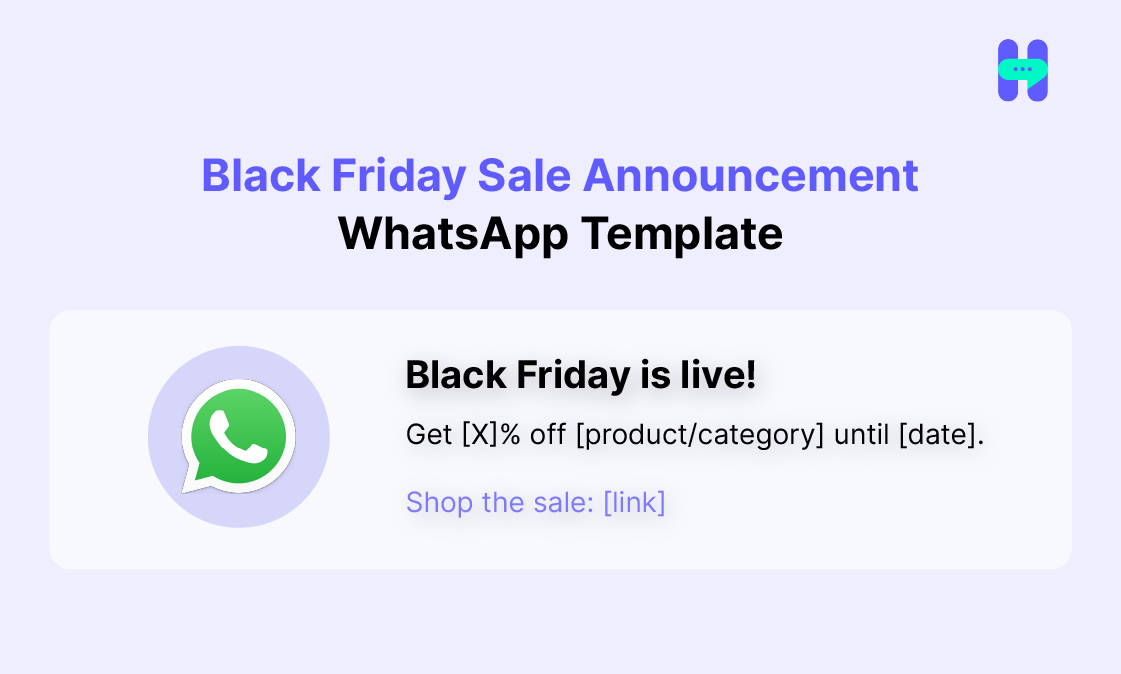
For WhatsApp, you can add product images or other relevant media where appropriate.
Black Friday Exclusive Offer WhatsApp Template
Template:
Hi {{First Name}}, we’ve got a Black Friday offer just for you.
Get [X]% off [product/category] with code [CODE].
Shop your exclusive offer: [link]
Black Friday Product Promotion WhatsApp Template
Use this when you want to highlight specific products instead of promoting the entire sale.
Template:
Black Friday picks are here
[Product Name] is now [price], down from [original price].
Want to see more deals? Explore the collection: [link]
Black Friday Abandoned Cart WhatsApp Template
Template:
Hi {{First Name}}, you left something behind.
Your [Product Name] is still in your cart, and the Black Friday offer is available until [date/time].
Complete your order: [link]
Black Friday VIP Offer WhatsApp Template
Template:
Hi {{First Name}}, as one of our valued customers, you get early access to our Black Friday offer.
Save [X]% on [product/category] with code [CODE].
Your offer ends [date/time]: [link]
Black Friday Last-Chance WhatsApp Template
Template:
Final call for Black Friday!
Your [X]% discount ends at [time] today.
Shop before the offer ends: [link]
You can find more ideas in HelloSend’s WhatsApp marketing templates and WhatsApp marketing message templates.
Cyber Monday SMS & WhatsApp Templates
Cyber Monday gives you another opportunity to reach shoppers after Black Friday. Use it to launch a new offer, extend the sale, or create a final shopping window.
Cyber Monday Sale Announcement Template
Cyber Monday is live! Save [X]% on [product/category] today only. Shop now: [link]
Cyber Monday Extended Offer Template
We’re extending the deal! Get [X]% off through Cyber Monday. Shop before [time]: [link]
Cyber Monday Product Promotion Template
Cyber Monday pick: [Product Name] is now [price]. Get yours today: [link]
Cyber Monday Last-Chance Template
Final hours of Cyber Monday. Your [X]% discount ends at [time]. Shop now: [link]
Holiday SMS & WhatsApp Templates
Black Friday is only the beginning of the holiday shopping period. These templates can help you cover Thanksgiving, Christmas, gift shopping, shipping deadlines, and New Year promotions.
Thanksgiving SMS Template
Happy Thanksgiving from [Brand]! Enjoy [X]% off [product/category] this weekend: [link]
Christmas Sale SMS Template
Christmas sale is here 🎄 Save [X]% on [product/category] until [date]. Shop now: [link]
Holiday Gift Promotion SMS Template
Looking for a holiday gift? Find [product/category] gifts from [price]. Shop our holiday collection: [link]
Last-Minute Holiday Shopping Template
Still shopping for the holidays? We’ve got gifts ready to order. Shop last-minute picks: [link]
Holiday Shipping Deadline Template
Order by [date/time] for delivery before [holiday]. Shop your holiday gifts: [link]
New Year Sale Template
Start the new year with [X]% off [product/category]. Our New Year sale ends [date]. Shop now: [link]
Holiday Sale Announcement WhatsApp Template
Our holiday sale is live!
Save [X]% on [product/category] through [date].
Explore the holiday collection: [link]
Christmas Promotion WhatsApp Template
Christmas is almost here!
Find gifts for [recipient/category] starting at [price].
Shop our Christmas picks: [link]
Holiday Gift Recommendation WhatsApp Template
Need help finding a gift?
Tell us who you’re shopping for and your budget, and we can help you find the right option.
Explore our gift collection: [link]
Last-Minute Holiday Offer WhatsApp Template
Running out of time?
Our last-minute holiday picks are still available.
Shop gifts you can order today: [link]
New Year Promotion WhatsApp Template
New year, new deals!
Get [X]% off [product/category] through [date].
Start the year with a great deal: [link]
Why Use SMS and WhatsApp Together for Holiday Campaigns?
SMS and WhatsApp can serve different purposes in the same campaign. Instead of choosing one channel or copying the same message across both, use each where it makes the most sense.
Use SMS for Time-Sensitive Promotions
SMS works well for short, direct messages such as:
- Sale launches
- Flash offers
- Discount reminders
- Shipping deadlines
- Last-chance messages
The message can focus on one offer, one deadline, and one action.
Use WhatsApp for Richer Conversations
WhatsApp gives you more room to provide product information, recommendations, media, and customer assistance.
For example, an SMS can announce that a Black Friday sale has started. WhatsApp can then help the customer explore products or answer questions before they buy.
Build a Connected Customer Journey
A holiday campaign can move customers between channels based on what they need.
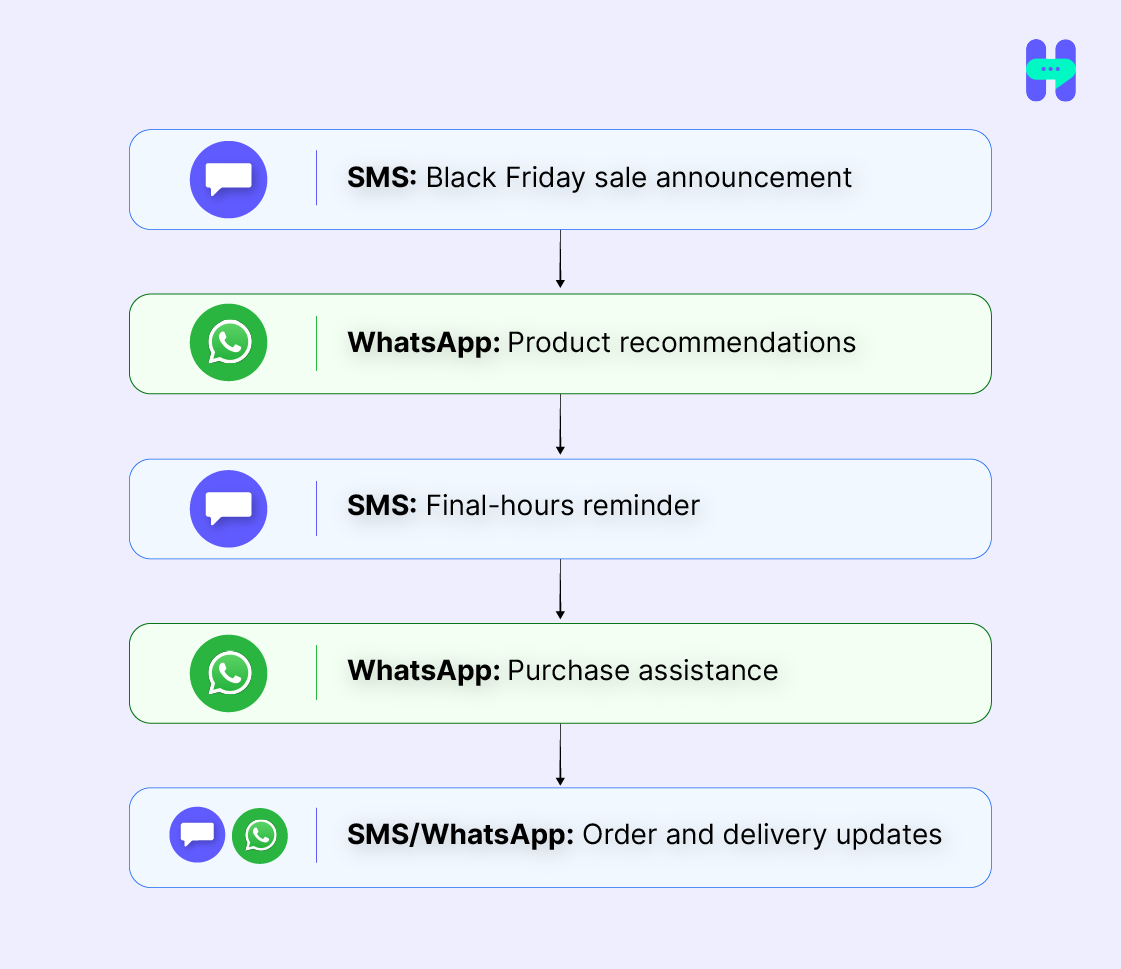
The goal is not to send the same promotion twice. Each interaction should have a clear purpose.
Avoid Sending the Same Message Twice
Using two channels does not mean doubling every message.
If a customer has already received the sale announcement through SMS, the next WhatsApp message could provide product recommendations or answer questions rather than repeat the same offer.
How to Plan a Black Friday SMS & WhatsApp Campaign
A simple campaign structure can help you decide what to send and when.
Before Black Friday
Build anticipation with teaser messages, early-access offers, or product previews.
During the Sale
Send the main offer, then follow up based on customer activity. For example, customers who abandoned their carts may need a different message from customers who have not interacted with the campaign.
Final Hours
Use short messages with a clear deadline. This is where last-chance SMS and WhatsApp templates can help close the campaign.
After Purchase
The conversation does not have to end when the customer checks out. Use appropriate messages for order confirmations, shipping updates, delivery information, and customer support.
When Should You Send Black Friday Messages?
There is no single timing schedule that works for every business. Your audience, offer, location, and campaign length should influence the timing.
When to Start the Campaign
Start early enough to build awareness before the main sale. Early-access and teaser messages can introduce the offer without using the main discount message too soon.
When to Send the Main Offer
Send the main Black Friday announcement when the sale is actually available. Make the start and end time clear.
When to Send Reminders
Use reminders during the sale, especially for customers who interacted with the offer but did not complete a purchase.
When to Send the Final Message
Send the last-chance message close enough to the deadline to create urgency, while still giving customers enough time to act.
How to Account for Customer Time Zones
Schedule messages according to the recipient’s local time where possible. A midnight deadline should also be clear about which time zone applies.
Turn these Templates into a Holiday Sequence
Pasting a template into a phone works for one message. A full holiday campaign needs templates that are saved once, personalized from your CRM, and scheduled by each customer's time zone.
HelloSend stores your SMS and WhatsApp templates, fills fields like {{First Name}} from HubSpot, Zoho CRM, or Pipedrive, and sends them as campaigns or as messages triggered by workflows such as cart abandonment.
Black Friday SMS & WhatsApp Mistakes to Avoid
Even a good template can lose its impact when the campaign is poorly managed.
Sending the Same Message on Both Channels
Use SMS and WhatsApp for different purposes instead of duplicating every campaign message.
Sending Too Many Messages
More messages do not automatically mean more sales. Give customers a reason to receive each message.
Ignoring Consent and Customer Preferences
Only message customers through channels where you have the appropriate permission and follow the applicable messaging requirements.
Sending the Same Offer to Every Customer
Use customer data and activity to make follow-ups more relevant. A first-time visitor, repeat customer, and abandoned-cart customer may need different messages.
Messaging at the Wrong Time
Consider customer time zones and the urgency of the offer before scheduling a message.
Using Urgency Without a Clear Deadline
“Ending soon” is less useful than a specific date and time. Tell customers exactly when the offer expires.
Forgetting Post-Purchase Communication
Holiday messaging should not stop at checkout. Order confirmations, shipping updates, and support messages are part of the customer experience too.
Conclusion
Black Friday and holiday campaigns do not have to rely on a single communication channel. SMS can handle direct, time-sensitive promotions, while WhatsApp can give customers more space for product information and two-way conversations.
The key is to use both channels with a clear purpose rather than sending the same message everywhere. Reusable templates, CRM personalization, and campaign automation can also make it easier to manage holiday communication at scale.
Frequently Asked Questions
What is a good Black Friday SMS template?
A good Black Friday SMS template clearly states the offer, deadline, and next action. For example: “Black Friday is here! Get 30% off until midnight. Shop now: [link].” You can adapt the offer, product, discount, and deadline to your campaign.
How often should I send Black Friday SMS messages?
There is no fixed number that works for every business. A practical campaign may include an early-access or teaser message, the main sale announcement, a relevant reminder, and a final message. Base additional messages on customer activity and preferences.
Is SMS marketing effective for Black Friday?
SMS can be useful for Black Friday because it gives businesses a direct channel for time-sensitive promotions, reminders, and last-chance offers. Its value depends on factors such as the offer, audience, timing, message relevance, and customer consent.
What is the best time to send Black Friday texts?
The best time depends on your audience, location, and campaign schedule. Send messages according to the recipient’s local time where possible, and avoid sending promotional messages at inconvenient hours. For deadline-based offers, make the expiration time clear.
Can I send Black Friday offers on WhatsApp as well as SMS?
Yes. SMS and WhatsApp can be used together, with each channel serving a different purpose. SMS can handle short promotional alerts and reminders, while WhatsApp can support richer product information, conversations, recommendations, and purchase assistance.

.webp)


.webp)
