Summarize this blog post with:
Quick Summary
Trigger Rules automate messaging workflows by executing predefined actions on specific events, enabling instant responses, CRM updates, and automated follow-ups while reducing manual effort and improving efficiency.
What Are Trigger Rules and Why Do Businesses Need Them?
In today’s fast-paced digital world, customers expect instant responses and seamless communication. However, without automation, businesses often face delayed replies, missed inquiries, and heavy manual workloads.
Trigger Rules solve this challenge by automating customer messaging and CRM workflows based on real-time events and conditions. Instead of manually handling every interaction, the system automatically monitors incoming messages and takes action when predefined criteria are met.
Whether it’s sending instant replies, capturing leads, or scheduling follow-ups, Trigger Rules ensure timely, consistent, and efficient communication—helping businesses scale operations and improve customer experience.
How Trigger Rules Work?
Trigger Rules follow a simple yet powerful automation model widely used in CRM and messaging platforms to streamline customer communication. Instead of manually reading and responding to every message, the system automatically processes incoming interactions and executes actions based on predefined logic—helping businesses respond faster and more efficiently.
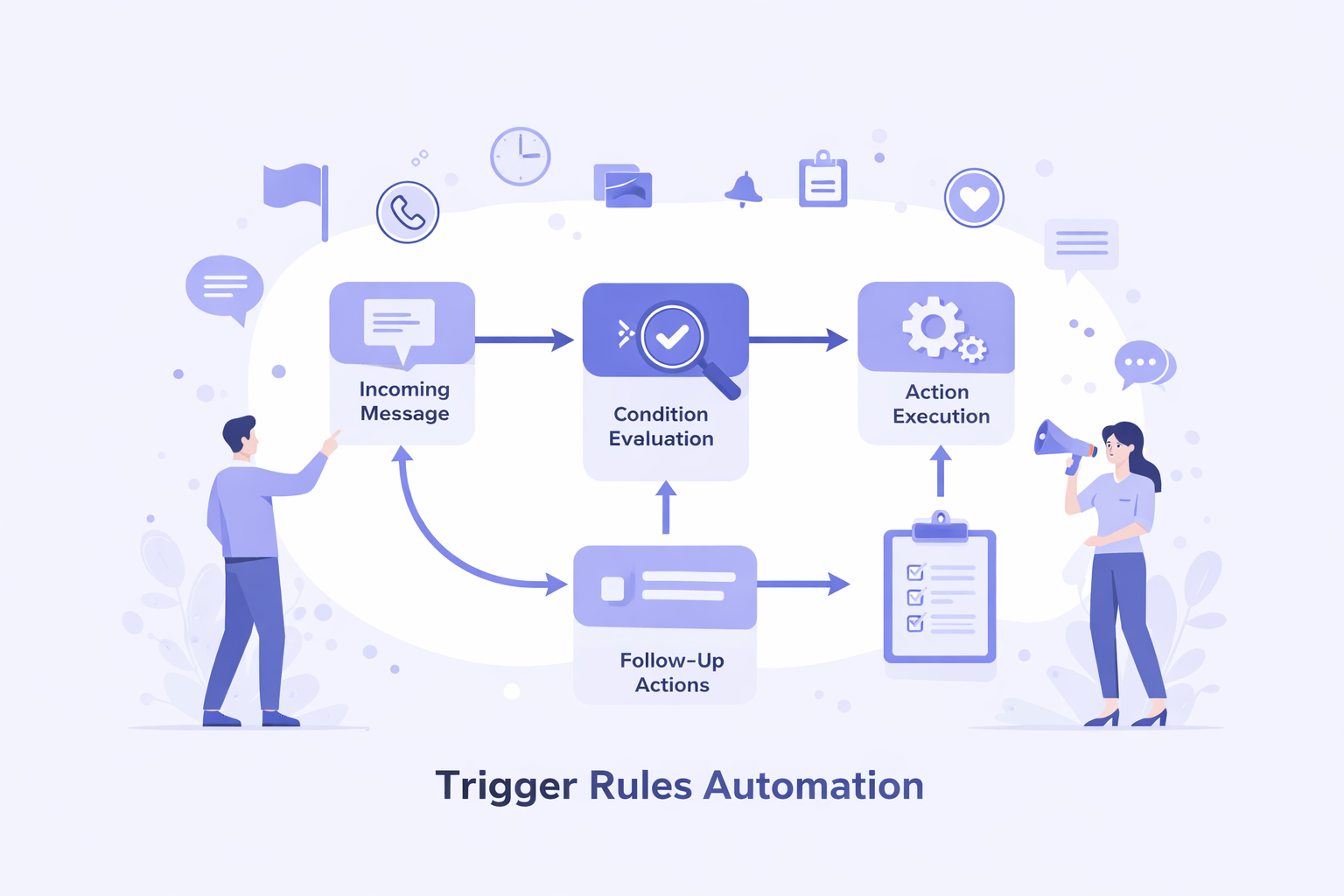
At its core, Trigger Rules operate on a structured flow:
Incoming Message → Condition Evaluation → Action Execution → Follow-Up Actions.
This flow ensures that every customer interaction is handled consistently and without delay.
1. Trigger-Based Automation
Everything begins with a trigger, which is simply the event that starts the workflow. This could be a customer sending a message, a message received during or outside business hours, or even a message sent to a specific number. Once this event occurs, the automation is instantly activated.
In automation systems, triggers act as the starting point that tells the system when to take action.
2. Condition Matching
After the trigger is activated, the system evaluates whether the message meets certain predefined conditions. These conditions can include keywords like “price” or “support,” specific numbers, or time-based rules such as business hours.
This step ensures that automation is relevant and accurate, allowing only matching messages to proceed further while filtering out unrelated interactions.
3. Automated Actions
Once the conditions are satisfied, the system automatically performs the configured actions. This may include sending instant replies, creating CRM leads, notifying team members, or logging messages as notes or activities.
These actions happen instantly without manual intervention, ensuring timely responses and consistent communication across all customer interactions.
4. Delay and Follow-Up Actions
Automation doesn’t stop at a single action. Businesses can introduce delays between steps to control timing—for example, sending an immediate reply, waiting for a few hours, and then sending a follow-up message.
This helps create more natural, well-timed communication flows that feel less robotic and more personalized, improving overall customer engagement.
_____________________________________________________________________________________
Example Use Cases
These example use cases are provided to show how auto-reply messages can be applied in real business scenarios to improve communication and efficiency.
- Customer Inquiry Responses – Auto-replies instantly acknowledge pricing or product queries, helping businesses engage customers quickly and reduce drop-offs.
- Lead Capture – Incoming messages from new contacts are automatically converted into CRM leads, ensuring no opportunity is missed.
- After-Hours Communication – Automated responses keep communication active outside business hours and set clear expectations.
- Service Requests – Keyword-based auto-replies deliver relevant responses based on customer intent, improving efficiency.
- Follow-Up Messaging – Scheduled messages re-engage customers, nurture leads, and increase conversion chances.
Auto Response Examples
Auto text reply examples highlight how businesses can use automation and instant response systems to streamline communication and improve customer engagement.
- Pricing Inquiry
“Thank you for contacting us. Our team will share pricing details shortly.”
When a customer sends a pricing inquiry, it reflects strong purchase intent and the need for quick information. An auto-reply message instantly acknowledges the request, preventing drop-offs due to delays and keeping the lead engaged. This ensures continuous communication until the sales team shares detailed pricing, improving conversions and customer experience.
- Customer Support
“We’ve received your request. Our support team will get back to you soon.”
Customer support scenarios occur when users need help or face issues, often expecting immediate acknowledgment. An automated reply confirms the request is received and reassures the customer that it is being handled. This reduces frustration, avoids repeated follow-ups, and improves support efficiency through instant response.
- After Business Hours
“Our team is currently unavailable. We’ll respond during business hours.”
After business hours, when customers reach out outside working time, delayed responses can create uncertainty. An auto-reply message informs them about your availability and sets clear expectations for follow-up. This ensures 24/7 communication and reassures customers that their message is not ignored.
- Order Confirmation
“Your request has been received successfully. We’ll update you shortly.”
Order confirmation scenarios happen right after a customer completes a purchase or request. An automated confirmation message provides instant acknowledgment, removing uncertainty and building trust. This keeps customers informed about the next steps while reducing unnecessary support queries.
How to Set Up Automated Response with HelloSend?
Setting up Trigger Rules automation streamlines communication by automatically sending messages, capturing leads, and managing CRM workflows—reducing manual effort and improving response speed.
Let’s walk through how you can set up an automated response step by step.
Access Automation
Login to HelloSend → Messaging → Automation → Trigger Rules
Step 1: Create a New Trigger Rule
Start by creating a new automation rule in your system. Click on New Trigger Rule, enter a meaningful rule name, and select Incoming Message as the trigger. This ensures that every incoming message can initiate the workflow automatically.
Step 2: Define Keywords and Match Type
Next, define keywords to identify customer intent. These keywords help the system understand what the customer is asking.
You can choose how the keyword should match:
- Starts With – Triggers when the message begins with the keyword
- Contains – Triggers when the keyword appears anywhere in the message
This step ensures that automation runs only for relevant messages.
Step 3: Configure Numbers
Select the sender number that will be used to send automated responses. This helps route messages correctly and ensures that replies are sent from the appropriate business number.
Step 4: Set the Run Schedule
You can control when the automation should run based on your business needs:
- 24/7 – Always active
- Business Hours – Runs only during business hours
- Outside Business Hours – Runs after business hours
- Specific Hours – Runs during selected time periods
Scheduling helps align automation with your availability and customer expectations.
Step 5: Add Messaging Actions
Now, configure the actual response that customers will receive. You can add automated replies and select predefined templates to ensure quick and consistent communication.
Step 6: Configure CRM Actions
Beyond messaging, Trigger Rules can also update your CRM automatically:
- Create Lead – Converts incoming messages into CRM leads
- Create Notes – Logs conversations as notes
- Create Activities – Tracks interactions as CRM activities
This ensures every customer interaction is recorded without manual effort.
Step 7: Add Delay and Follow-Up Actions
Finally, you can add delays between actions—ranging from 15 minutes to 30 days—to control timing and create well-paced Trigger Rules automation workflows.
This allows you to schedule follow-ups and create more natural communication flows.
Why Choose HelloSend?
HelloSend is a powerful SMS automation and customer communication platform designed to streamline business messaging, improve workflow efficiency, and boost customer engagement through intelligent automation.
- Flexible Automation Rules – Create advanced SMS automation workflows using triggers, conditions, and customer actions to deliver personalized and timely responses.
- CRM Integration – Seamlessly integrate with your CRM to capture leads, manage customer data, and automate follow-ups, improving sales and relationship management.
- Scheduling Control – Schedule messages and automation rules to run at optimal times, ensuring timely communication and higher response rates.
- Workflow Timing Management – Add delays and step-based automation to create well-timed, personalized customer journeys that enhance engagement.
- Scalable Communication – Handle high volumes of messages efficiently with bulk messaging and automation, making it ideal for growing businesses.
Benefits of Trigger Rules
Trigger Rules enable businesses to automate customer communication workflows, helping teams manage interactions efficiently at scale while improving response quality and speed.
- Faster Response Time – Instantly respond to customer inquiries using SMS automation and automated messaging, improving response speed, customer satisfaction, and real-time communication.
- Reduced Manual Effort – Automate repetitive messaging tasks with workflow automation, saving time and reducing operational workload while improving efficiency.
- Consistent Communication – Deliver accurate, standardized responses through automated text messaging, ensuring consistent brand communication across all customer interactions.
- Improved Lead Management – Capture customer details automatically and create CRM leads using integrated SMS automation systems, ensuring no business opportunity is missed.
- Better Workflow Control – Use scheduling, delays, and structured automation workflows to send messages at the right time and improve customer engagement.
- Enhanced Productivity – Streamline business communication with automated messaging platforms, enabling teams to handle more conversations efficiently and focus on high-value tasks.
_____________________________________________________________________________________
Conclusion
Manual customer communication slows down your business—delayed responses, missed leads, and inconsistent follow-ups can cost you valuable opportunities every day.
Trigger Rules automation solves this problem by streamlining SMS automation, CRM workflows, and follow-up messaging. With automated messaging, you can respond instantly, capture every lead, and deliver a seamless customer experience—all without increasing manual effort. This leads to faster response times, higher conversions, and scalable business growth.
Don’t let manual processes hold your business back. Start using Trigger Rules automation with HelloSend today and transform the way you communicate with your customers. Automate smarter, respond faster, and never miss an opportunity again.
👉 Sign up now to unlock powerful SMS automation and CRM workflow management.
__________________________________________________________________________
FAQs
1. What is an automated text response?
An automated text response is a predefined message sent automatically using Trigger Rules automation when specific triggers or conditions are met. It helps businesses improve response times, engage customers instantly, and streamline SMS and messaging workflows.
2. Can responses be triggered by keywords?
Yes. Keyword-based automation detects specific words in incoming messages and triggers relevant replies. This ensures targeted customer communication and improves engagement while saving time for your team.
3. Can automation run outside business hours?
Absolutely. Trigger Rules automation can run 24/7 or according to your custom schedule, including business hours or after-hours. This enables continuous messaging and ensures no customer inquiry is missed.
4. Can CRM records be created automatically?
Yes. Automated workflows can integrate with your CRM system to create leads, log notes, and track activities without manual effort. This improves data accuracy and ensures all customer interactions are recorded efficiently.
5. Can messages be delayed in workflows?
Yes. Automated messaging workflows support delay steps, allowing you to schedule follow-ups and control timing—from minutes to days—ensuring well-timed and personalized communication.